
Driveroo vs Samsara (2026): Telematics With Add-On DVIR vs Focused Inspection, Compliance and Maintenance, Pricing Comparison
Last updated November 19, 2026. Pricing and ratings checked November 13, 2026.
Driveroo vs Samsara for DVIR, pre-trip, and vehicle inspection apps: both support the pre-trip check under 49 CFR 392.7, record the DVIR under 396.11, and send defects to maintenance. Driveroo focuses on inspection, compliance and maintenance for vehicles and equipment, including forklift checks under 29 CFR 1910.178(q)(7), from $5 per asset per month, and can connect to Samsara on Enterprise. Samsara is a telematics platform for GPS, ELD, and AI dash cams, with the DVIR bundled into each vehicle license and equipment inspections sold as per user Forms licenses.
Verdict
Samsara is best for:
- Fleets that must run ELD hours of service and want GPS tracking and AI dash cams, with the DVIR included in the vehicle license.
- Fleets that want telematics for ELD, GPS tracking, and dash cams to manage operations, along with maintenance and safety coaching, from a single vendor.
- Fleets with concerns about driver operations or safety that want dash cams to monitor driver behavior.
Driveroo is best for:
- Fleets and equipment operations that need inspection, compliance and maintenance without a telematics purchase: no gateway, no hardware, priced per asset with unlimited users.
- Samsara fleets that want more than a DVIR checklist: guided visual inspections with video, AI guidance and safety coaching for the driver from dash cam and telematics data, and every defect tracked to its repair, connected to Samsara on Enterprise. See the Driveroo DVIR page.
- Operations with forklifts, cranes, and heavy equipment, or with mixed telematics from Samsara, Geotab, Motive, Azuga, or Verizon Connect, inspected in one app.
The deciding difference
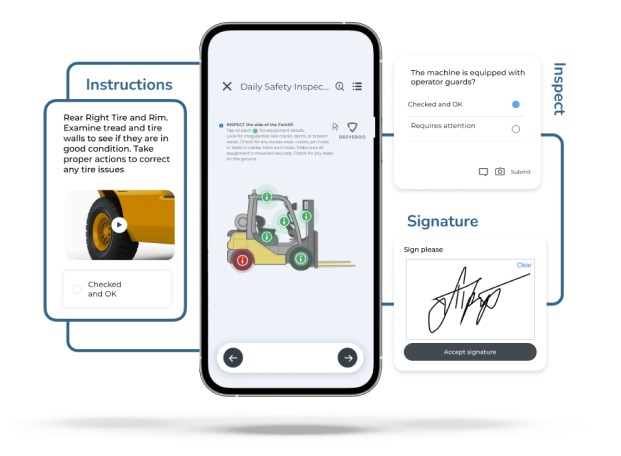 Driveroo app screens
Telematics With Add-On DVIR vs Focused Inspection, Compliance and Maintenance
Illustration of a telematics driver app, not a screenshot
Samsara: telematics with an add-on DVIR
The DVIR is one tile among the driver log, routing, and messages.
Samsara’s focus for its platform is hardware: a gateway in each vehicle for GPS, diagnostics, and ELD logs, then AI dash cams and equipment trackers. The DVIR is one tile in the Samsara Driver App, alongside the driver log, routing, and messages, and it comes with the vehicle license. Many fleets run it on a tablet mounted in the cab. Inspections of forklifts and other equipment run through Forms, licensed per user, and maintenance planning sits in Samsara’s higher telematics plans.
Driveroo app screens
Driveroo: focused inspection, compliance and maintenance
Guided checks that run through to the repair.
Driveroo’s focus is digitizing and automating the physical work, from the inspection through maintenance and repair. Each workflow is implemented for the asset, shows the driver that vehicle or machine on screen, and guides the check with images, video, and AI. Every finding becomes a defect with its own status, repair record, and next driver review, and maintenance plans, costs, and compliance records share that data. No gateway is required, and on Enterprise, Driveroo integrates with Samsara through its API, or with other telematics, to deliver the combined functionality.
Both record the DVIR. The difference is focus: a DVIR included in a telematics suite, or a platform built to automate and guide the inspection and everything after it. To see how other DVIR tools compare, see how DVIR apps compare, and for the daily check under 49 CFR 392.7, see pre-trip inspection apps compared.
Driveroo vs Samsara at a Glance
| Fact | Samsara | Driveroo |
|---|---|---|
| Starting price | Base telematics estimated at $27 to $33 per vehicle per month (third-party estimate). Full vehicle gateway license $39 per vehicle per month list, plus $179 per gateway. Samsara sells by quote | $5 per asset per month (Essentials), annual contract |
| Pricing model and tiers | Per device license on a multiyear term, plus hardware. Maintenance requires the full license at $39 list, about $6 to $12 per vehicle per month above the estimated base. Forms are licensed per user at $10 (Essential) and $20 (Premier) per user per month list. Connected Training needs its own license, priced by quote | Per asset, unlimited users. Essentials $5 and Pro $7 per asset per month. Enterprise by quote, with AI and the Samsara, Geotab, Motive, Azuga, Verizon Connect, and Trimble integrations. Discounts for annual payment, volume, and multiyear agreements |
| Free trial and contract terms | Free trial through sales; length not stated. Contracts commonly run three years, and a plan cannot be downgraded during the term | No free trial listed on the pricing page; trials can be arranged with the sales team. Annual contracts; minimums apply. Payment terms can be negotiated |
| Setup model | Self-install hardware with guided onboarding. The customer builds DVIR templates and Forms in the dashboard, with a template library and AI form creation | Concierge. Driveroo configures inspection workflows as part of the subscription. No self-authoring tool today. Typical time to live: 2 weeks |
| Hardware required | Yes. Every licensed vehicle or asset needs a Samsara device, and devices stop working if the license lapses | None. Works on the driver’s phone or tablet |
| Platforms and offline | iOS and Android apps, plus web. Offline DVIR on DVIR 2.0 (app version 2542.100 or later); queued work sends when the app regains signal | iOS and Android apps, plus web. Offline inspections: yes, with automatic upload on reconnect as an option |
| Ratings (G2 / Capterra) | 4.5 (3,992 reviews) / 4.5 (1,071 reviews). Checked November 12, 2026 | 4.9 (45 reviews) / 4.8 (23 reviews). Checked November 4, 2026 |
| Best for | Fleets that must run ELD and want telematics, dash cams, and an included DVIR from one vendor | Fleets and equipment operations that want focused inspection, compliance and maintenance, with or without telematics, priced per asset |
Where Driveroo and Samsara Differ
| Feature | Samsara | Driveroo |
|---|---|---|
| The inspection | ||
| What the driver sees | A DVIR checklist: defects picked from Samsara’s list or added as custom defects in fixed locations, with sections that can be added or renamed in DVIR 2.0 | The exact vehicle or machine on screen, with each inspection point marked, mixed with icons, text, and example images as the fleet prefers |
| Photos and video | Photos only. Legacy DVIR allows four photos per vehicle and three per trailer; DVIR 2.0 adds as many photo fields as needed, and each photo must be under an hour old. Samsara’s DVIR guides describe photos; they describe no video in the DVIR | Unlimited photos and video on every plan, with no video length limit and no photo age rule. Spoken notes are captured in the video |
| Inspection integrity (monitoring) | DVIR 2.0 checks photo freshness, matches each photo to the requested component with AI, requires the driver to be near the vehicle, and can set a minimum inspection time | Inspection photos can include overlays to frame the shot, and Enterprise AI can check photo accuracy. A yard geofence, using the phone or telematics, flags a unit that leaves a yard without an inspection. Enterprise AI scans inspection reports for unacceptable photos and compares images for defects |
| How the inspection adapts | Templates assigned per vehicle or trailer. Samsara’s DVIR guides describe no rules that change the inspection by driver, defect history, or conditions | Automations and branching logic can guide the inspection. Workflows are assembled dynamically, so the inspection can be personalized to the worker’s experience or to environmental conditions |
| Equipment and forklift inspections | DVIR covers vehicles and trailers. Forklifts and equipment run through Forms at $20 per user per month list for Forms Premier, with a minimum of two licenses; Asset Inspections (September 2026) licensing is not published | Same platform and app for trucks, trailers, forklifts, cranes, and heavy equipment, with customized inspections, priced per asset with unlimited users |
| Inspections without signal | DVIR 2.0 saves the full inspection offline and syncs later. Samsara’s guides do not say whether photo validation or the proximity check runs without signal, and advises drivers to keep the app open until the status shows Successfully Submitted | Offline on every inspection, with automatic upload when the phone reconnects, so closing the app does not interrupt the submission. AI runs on the mobile device |
| Defects and repair | ||
| Defect status and closure | The mechanic resolves defects and certifies the vehicle safe in the dashboard. One reviewer reports a DVIR showing closed when only some defects were repaired | Each defect keeps its own status, from routed to repaired or acknowledged, with repeat defects linked to the first report and an audit trail from capture to repair |
| Next driver review | The app asks the next driver to certify whether resolved defects were fixed, and DVIR 2.0 lists open defects to recheck | Each prior defect and its repair appear at the related inspection point with that item’s history; the driver accepts or rejects each repair and signs |
| Outside repair shops | A work order records the vendor and an invoice or PO number. AI estimates a repair’s cost so a team can challenge a shop’s quote, and AI scanning loads the invoice. Samsara’s work order guides describe no step to approve a shop’s estimate before work starts | On Pro, outside shops submit estimates that a manager approves before the work starts, point to point with the fleet’s own vendors |
| Maintenance and beyond | ||
| Maintenance plan access | Requires the full telematics license, $39 per vehicle per month list, an estimated $6 to $12 above base telematics | Defects route to maintenance on every plan. Pro at $7 per asset adds work orders, a planned maintenance calendar, approval rules, and a labor clock with pause |
| Workflows beyond the inspection | Forms per user for safety and equipment checks; route forms for proof of delivery are included up to 10 templates per category and 20 fields per template | Workflows for safety training, loading checks, work instructions, and proof of delivery, with the same AI and embedded training, priced per workflow, in bundles, or per user |
What both do
Both platforms offer e-signatures, voice to text for defect notes, work orders created from defects, preventive maintenance schedules, parts inventory, purchase orders and vendor records (on Driveroo Enterprise), cost reporting, and alerts on unsafe defects. Samsara also offers a Technician App for mechanics, and Driveroo mechanics record repairs on a mobile device.
How Each Platform Supports DVIR and Daily Equipment Checks
Under 49 CFR 396.11, a driver reports defects at the end of each day’s work, the carrier certifies the repair or that no repair is needed before the vehicle runs again, and the report is kept three months. Under 49 CFR 396.13, the next driver reviews the last report before driving. Under 29 CFR 1910.178(q)(7), a forklift is examined before use and removed from service when a condition affects safety. 49 CFR 396.11 49 CFR 396.13 29 CFR 1910.178(q)(7)
The driver’s report.
SamsaraSamsara’s DVIR 2.0 offers safeguards: photos must be fresh and match the part, and the driver must stand near the vehicle. The report itself is a list of defects with photos.
DriverooDriveroo’s safeguards include an option to require live camera photos, framing overlays, AI photo checks on Enterprise, and alerts for missed inspections and for units that leave the yard without one.
Where Driveroo is stronger: the driver is shown what to check, not only checked on.
Getting the report to the carrier from a dead zone.
SamsaraSamsara saves an offline DVIR 2.0 report and sends it later, but tells drivers to keep the app open until it shows Successfully Submitted, since closing it early can disrupt the submission, and its guides do not say how the one hour photo rule and AI checks behave without signal.
DriverooDriveroo uploads automatically on reconnect, and its AI can run on the device.
Where Driveroo is stronger: a closed app does not put the report at risk.
Certifying the repair.
SamsaraIn Samsara, a mechanic resolves defects and certifies the vehicle safe in the dashboard.
DriverooDriveroo records the repair against each defect, with parts, labor, and photo proof, or marks it Acknowledged when no repair is needed, so each defect’s certification stands on its own, whether recorded in a mobile work order or an inspection workflow.
The forklift check.
29 CFR 1910.178(q)(7)SamsaraSamsara runs forklift inspections through Forms, licensed per user.
DriverooDriveroo inspects forklifts in the same app as trucks, and an out of service status can block the next inspection on an unsafe truck.
Where Driveroo is stronger: one app and one price per asset across vehicles and equipment.
Samsara’s proximity check and AI photo validation are a real deterrent to inspections done from the cab, and Driveroo does not run a proximity check at submission. Driveroo relies on optional live camera photos, AI image checks, missed inspection alerts, and geofencing to protect each inspection’s integrity.
Compliance depends on how each carrier or employer follows the rules and applies tools such as Samsara and Driveroo; having either platform does not by itself make an operation compliant. For the full rules, see 49 CFR 396.11 and 396.13 explained and OSHA daily equipment checks.
The same inspection in both tools
A Cracked Marker Lamp Logged in a Dead Zone
At a remote yard with no cell signal, a driver finishing a post-trip finds a cracked rear marker lamp lens on the trailer. Lighting devices are among the parts a DVIR must cover, and the repair should be made before the next trip. Here is how the finding moves through each platform.
In Samsara
- Start the DVIR.The driver selects the tractor and trailer, taps the DVIR tile, and chooses Post-Trip. On DVIR 2.0, the report can be completed offline.
- Log the defect.The driver selects the lighting defect, dictates a description, and takes a photo, which must be under an hour old and match the part requested.
- Set the status and sign.The driver marks the unit Safe to drive with the defect noted and signs; the app requires the driver to be near the vehicle.
- Wait for signal.The report sits on the phone until it reconnects, and the driver keeps the app open until it shows Successfully Submitted.
- Repair.In the dashboard, the defect appears in the DVIR Defects report, a work order is created from it, and the mechanic resolves the defect and certifies the repair.
- Next driver.At the next DVIR, the app asks the driver to certify whether the resolved defect was fixed.
In Driveroo
- Briefing.On Enterprise, the AI briefing recaps the trailer’s recent inspections and flags items to watch.
- Inspect the lights.The marker lamps appear on an image of that trailer, with an example photo of a cracked lens. When the driver fails the point, rules set its severity as a defect to repair before the next trip.
- Capture it.The driver takes a photo of the lens, live from the camera where the fleet requires it, adds a comment by voice to text, and signs.
- Leave the yard.The report is stored on the phone and uploads on its own when the truck reaches coverage, whether or not the app is open.
- Route the repair.Maintenance is alerted by severity. On Pro, rules can open a work order automatically, or a manager can open it. On Enterprise, the due time can be set from the truck’s next route or dispatch.
- Repair recorded.The mechanic records the new lens, labor, and photo proof against the defect on their mobile device.
- Next driver signs off.At the marker lamps, the next driver sees the defect, the repair, and its history, then accepts or rejects the fix and signs.
Worked pricing example
What Inspections and Maintenance Cost for 50 Trucks and 15 Forklifts
A fleet with 50 trucks and 15 forklifts, 20 forklift operators, and one admin. Samsara sells by quote; list prices below come from Samsara’s public cooperative price sheet, and the base telematics figure is a third-party estimate. Driveroo prices are list: price × assets × 12 months.
- 50 trucks
- 15 forklifts
- 21 users (20 forklift operators, one admin)
| Capability level | Samsara | Driveroo |
|---|---|---|
| Truck telematics, DVIR included | Base telematics, estimated at $27 to $33 per vehicle per month (third-party estimate): $16,200 to $19,800 a year, plus $179 × 50 = $8,950 in gateways | Not included. On Enterprise, Driveroo uses the fleet’s existing telematics |
| Adding maintenance | Full vehicle gateway license, $39 × 50 × 12 = $23,400 a year list, an estimated $3,600 to $7,200 above base telematics | Pro: $7 × 65 × 12 = $5,460 a year, covering inspections, work orders, and planned maintenance for all 65 trucks and forklifts |
| Forklift inspections | Forms Premier, $20 × 21 users × 12 = $5,040 a year list | Included in the Pro price above, with unlimited users |
| Inspections only | Not sold separately; the DVIR comes with the telematics license | Essentials: $5 × 65 × 12 = $3,900 a year |
| Driver training | Connected Training: quote | Safety coaching in the inspection pre-briefing on Enterprise |
| AI and telematics connection | AI Included with every paid license; AI Pro and AI Max by quote | Enterprise: quote (AI, the Samsara API connection, vendor management, and purchase orders) |
Samsara: maintenance and forklift Forms added to base telematics$8,640 to $12,240a year, estimate
Driveroo Pro for all 65 trucks and forklifts$5,460a year at list price
For this fleet, adding maintenance and forklift Forms to Samsara’s base telematics costs an estimated $8,640 to $12,240 a year. Driveroo Pro covers inspections, work orders, and planned maintenance on every truck and forklift for $5,460, with mileage and hours captured in each inspection. Samsara opens its API to all customers, and on Enterprise Driveroo reads Samsara data through that API, so a fleet can keep Samsara at the base tier for GPS, driver logs, and dash cams and connect it to Driveroo. Samsara plans cannot be downgraded mid-term, so the change usually lands at renewal. Driveroo requires annual contracts, and minimums apply.
Running Driveroo With Samsara, and Across Mixed Fleets
Running both.
Samsara and Driveroo overlap on the DVIR, maintenance, and work orders. Fleets that run both use Samsara for GPS, driver logs, and dash cams, and Driveroo for the frontline work done on a phone or tablet: inspections, defect capture, repairs, and next driver sign off. Maintenance and work order data can flow both ways through the API, as the fleet chooses, so records stay where each team works. On Enterprise, Driveroo reads Samsara data through the Samsara API, which works on Samsara’s base telematics plan; odometer and engine hours can set maintenance due dates. The Driveroo app can be added to the Samsara Driver App, so drivers start from the app they already use.
Running mixed fleets.
Not every asset needs telematics, and gateways and licenses on every forklift, trailer, or piece of yard equipment add up fast. Many fleets also run more than one telematics brand. Driveroo gives every asset and every worker the same capabilities: guided inspections, defect tracking, repairs, and maintenance plans for trucks, trailers, forklifts, cranes, and heavy equipment, in one app, priced per asset, with or without telematics. On Enterprise, Driveroo connects to Samsara, Geotab, Motive, Azuga, and Verizon Connect, and to Trimble for carriers that run a transportation management system.
What Reviewers Say
Samsara
G2 4.5 (3,992 reviews)Capterra 4.5 (1,071 reviews)
- Easy to start and use.Capterra reviewers rate setup and daily use highly, with 94% of 175 related reviews positive, and many praise the live tracking and dash cam footage.
- The DVIR is basic.A Capterra reviewer calls the DVIR “very limited” and wants photos on every item, and a repair technician wants more detail and customization in DVIR reports. On G2, Samsara scores 7.8 out of 10 for fleet maintenance and 8.2 for DVIR.
- Billing, contracts, and glitches.Capterra marks 84% of 63 billing reviews negative and 64% of 137 reviews on glitches and delays negative. Some reviewers describe AI camera alerts that fire too often.
Driveroo
G2 4.9 (45 reviews)Capterra 4.8 (23 reviews)
- Help when it is needed.Capterra reviewers score Driveroo’s customer service 5.0 and mention fast, useful replies.
- Set up around the fleet.One Capterra reviewer notes Driveroo adapted the software to the fleet’s existing routines.
- Room to improve on Android.A few reviewers want a smoother Android app and easier navigation, and one asks for live chat.
Frequently Asked Questions
8 questions on fit, pricing, forklifts, dead zones, defects, and running both.
Is Driveroo or Samsara the better DVIR and pre-trip inspection app for fleets that want more than a DVIR checklist?
Samsara and Driveroo are designed around different needs. Samsara is hardware first: gateways and AI dash cams for GPS, driver logs, and video safety, with a DVIR included in each vehicle license. Driveroo is software first: inspection to repair, with guided inspections on an image of each asset, every defect tracked to its repair and the next driver’s sign off, and maintenance priced per asset with unlimited users. The primary need decides the choice, and many fleets use both, keeping Samsara for telematics and connecting Driveroo through the Samsara API on Driveroo Enterprise.
How much does Samsara cost compared with Driveroo?
Samsara sells by quote. Its public cooperative price sheet lists the full vehicle gateway license at $39 per vehicle per month and the gateway at $179, and third-party research estimates base telematics at $27 to $33 per vehicle per month. Equipment inspections need Forms licenses, listed at $20 per user per month for Forms Premier. Driveroo lists Essentials at $5 and Pro at $7 per asset per month on annual contracts, with Enterprise by quote. For 50 trucks and 15 forklifts, Driveroo Pro comes to $5,460 a year, while Samsara Forms for 21 forklift users lists at $5,040 a year before any telematics.
Does Samsara charge extra for forklift and equipment inspections?
Samsara, yes; Driveroo, no. Samsara’s DVIR covers vehicles and trailers, and forklift or equipment checks run through Forms, licensed per user with a minimum of two licenses; Forms Premier lists at $20 per user per month. Driveroo inspects trucks, trailers, forklifts, cranes, and heavy equipment in one app with customized inspections, priced per asset with unlimited users.
Do Samsara and Driveroo work without cell signal?
Yes, both do, with a difference in how reports reach the office. Samsara DVIR 2.0 saves an offline inspection and syncs later, but Samsara advises drivers to keep the app open until the report shows Successfully Submitted, and photos must be under an hour old. Driveroo works offline on every inspection, can upload automatically when the phone reconnects even if the app was closed, and runs its AI on the device.
Do Samsara and Driveroo show the last DVIR’s defects to the next driver?
Yes, both do. Samsara asks the next driver to certify whether resolved defects were fixed, and DVIR 2.0 lists open defects to recheck. Driveroo shows each prior defect and its repair at the matching inspection point with that item’s history, and the driver accepts or rejects each repair with a signature. Under 49 CFR 396.13, the driver reviews the last DVIR before driving.
How do Samsara and Driveroo record the repair of each DVIR defect?
In Samsara, a mechanic resolves defects and certifies the vehicle safe in the dashboard, and work orders can be created from defects. In Driveroo, each defect keeps its own status, and the repair is recorded against it with parts, labor, and photo proof, through a mobile work order or an inspection workflow, or the defect is marked Acknowledged when no repair is needed. Under 49 CFR 396.11, the carrier certifies each repair, or that none is needed, before the vehicle is driven again.
Can Driveroo work with Samsara telematics?
Yes. On Enterprise, Driveroo connects to Samsara through the Samsara API, which works on Samsara’s base telematics plan, and maintenance and work order data can flow both ways. The Driveroo app can be added to the Samsara Driver App. Driveroo also integrates with Geotab, Motive, Azuga, Verizon Connect, and Trimble.
Do Samsara and Driveroo support daily forklift inspections under OSHA?
Yes, both do. Samsara runs forklift checklists through Forms, licensed per user. Driveroo inspects forklifts in the same app as trucks, with images of the truck and embedded training, and a forklift with an open safety defect can be set out of service until the repair is recorded. Under 29 CFR 1910.178(q)(7), a forklift is examined before use and removed from service if it is unsafe.
See Your Trucks and Forklifts in One Inspection App
Driveroo runs guided checks on a phone with no gateway to install, bills per asset with unlimited users, and on Enterprise reads the Samsara data your fleet already has.
© Driveroo 2026 · Asset and Fleet Management Software Privacy · Terms
This site uses cookies. We do this to remember your preferences so that we can improve our service. By using our site, you agree to our use of cookies.