
Driveroo vs SafetyCulture, Now Mitti (2026): DIY Inspection Forms vs Purpose-Built Inspection, Compliance and Maintenance, Pricing Comparison
Last updated November 19, 2026. Pricing and ratings checked November 10, 2026.
Driveroo vs SafetyCulture (now Mitti) for DVIR, pre-trip, and vehicle inspection apps: both support the pre-trip check under 49 CFR 392.7, the DVIR under 396.11, and daily forklift checks under 29 CFR 1910.178(q)(7). Driveroo is purpose-built inspection, compliance and maintenance workflow, from $5 per asset per month: it adapts each inspection, routes defects to repair, and confirms the fix with the next driver. SafetyCulture is a digital form builder with task management: your team builds each form, and a problem becomes a task to close.
Verdict
SafetyCulture is best for:
- Organizations that want a simple form builder for a variety of uses: safety audits, site checks, training, and issue reporting, with vehicle inspections as one form among many.
- Small teams that want a free tool, up to 10 users and five active forms, to design and change their own forms, starting from a public template library or the AI Assistant within a monthly AI credit allowance.
- Yards that outsource maintenance and have few people, since Premium is priced per seat at $24 per month on annual billing rather than per asset.
Driveroo is best for:
- Operations that want DVIR and pre-operation workflows that automate the compliance and maintenance process and close the loop with preventive maintenance schedules, defect management, and repair work orders.
- Teams that want smart, guided inspection workflows, embedded training and coaching options, and prior issue recall to support DVIR compliance. See the Driveroo eDVIR app.
- Fleets and equipment operations where many drivers or operators inspect every day, since pricing is per asset with unlimited users.
The deciding difference
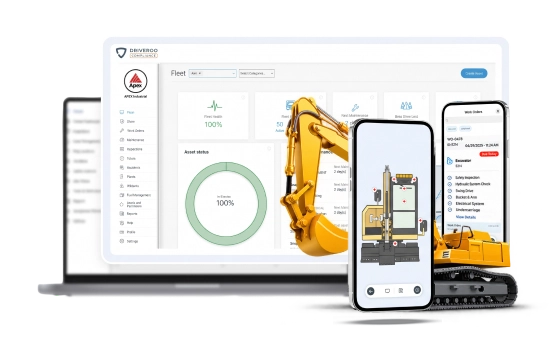 Driveroo app screens
DIY Inspection Forms vs Purpose-Built Inspection, Compliance and Maintenance
Illustration of a form builder, not a screenshot
SafetyCulture: DIY inspection forms
A form your team builds, answered question by question.
SafetyCulture began as iAuditor, a mobile checklist app, and grew through its free plan into a platform that Mitti says is used across 80,000 organizations. Underneath, the model is the same everywhere: a form your team builds, answered question by question, and a task when an answer needs follow up. That model stretches to a site audit, a food safety check, or a vehicle walkaround, because each one is another form.
Driveroo app screens
Driveroo: purpose-built inspection, compliance and maintenance
A failed point starts an automated process.
Driveroo was built around the process that follows a vehicle or equipment inspection. Each workflow is implemented with images of the asset, embedded training, and logic that changes the path for the driver, the asset, and conditions. A failed point becomes a defect, routes to maintenance, can become a work order on Pro, and returns to the next driver for confirmation. Preventive maintenance, parts, and compliance records run on the same data.
Both capture what a driver finds. The difference is whether that finding is an answer on a form with a task attached, or the start of an automated process. To see how other platforms handle these checks, compare pre-trip inspection apps and compare DOT compliance inspection software.
Driveroo vs SafetyCulture at a Glance
| Fact | SafetyCulture (now Mitti) | Driveroo |
|---|---|---|
| Starting price | Free for up to 10 users. Premium $24 per seat per month billed annually, or $29 billed monthly | $5 per asset per month (Essentials), annual contract |
| Pricing model and tiers | Per seat. Free, Premium, and Enterprise (quote, site-based pricing). Full seats are needed for regular inspectors; Lite seats allow 12 inspections a year and guest seats 3 in total. Asset maintenance programs are listed with Premium and Enterprise, still in Early Access, with no separate price published. AI credits included on every plan: capped on Free, with credit subscriptions or overage billing on Premium and Enterprise | Per asset, unlimited users. Essentials $5 and Pro $7 per asset per month. Enterprise by quote. AI available on Enterprise. Discounts for annual payment, volume, and multi-year agreements |
| Free trial and contract terms | 30-day free trial of Premium. Monthly or annual billing; annual billing saves about 17%. Free plan limited to five active templates | No free trial listed on the pricing page; trials can be arranged with the sales team. Annual contracts; minimums apply. Payment terms can be negotiated |
| Setup model | Self-serve. The customer builds templates from scratch, from a public library of community templates, from an uploaded PDF or image, or with AI, and maintains them | Concierge. Driveroo configures inspection workflows as part of the subscription. No self-authoring tool today. Typical time to live: 2 weeks |
| Hardware required | None. Integrates with Samsara, Geotab, Motive, and other telematics sources, and sells its own GPS trackers as an add-on | None. Integrates with Samsara, Geotab, Azuga, Motive, and Verizon Connect, and runs inside the Samsara and Geotab driver apps |
| Platforms and offline | iOS and Android apps, plus web. Offline inspections: yes, with photos and videos synced on reconnect | iOS and Android apps, plus web. Offline inspections: yes |
| Ratings (G2 / Capterra) | 4.6 (485 reviews) / 4.6 (355 reviews). Checked November 10, 2026 | 4.9 (45 reviews) / 4.8 (23 reviews). Checked November 4, 2026 |
| Best for | Organizations that want a simple DIY form builder with task management for audits, training, issues, and inspections | Fleets and equipment operations that want inspection, compliance, and maintenance automated as one workflow, priced per asset |
Where Driveroo and SafetyCulture Differ
| Feature | SafetyCulture (now Mitti) | Driveroo |
|---|---|---|
| The inspection | ||
| What the driver sees | Questions grouped in sections, answered from response sets the template defines. An instruction field can show an image or PDF of up to 20MB | A visual of the exact asset: images of the vehicle or equipment with each inspection point marked, combined with icons and text as the fleet chooses |
| Training during the inspection | Instruction fields carry text, images, or PDFs up to 20MB; Mitti’s instruction field guide lists no video. Courses run in the separate Training module | Image galleries, equipment photos, and video instructions inside the inspection, at the point being checked |
| How the inspection branches | No branching. Each question has a set of defined options tied to its own answer: open nested follow up questions, require a note, photo, or action, notify someone, or skip to the end. A question cannot read an earlier answer, show or hide pages, or jump to another section | The workflow itself can branch. A defect, its severity, or data entered can change the steps that follow, add instructions, or route the driver down a different path, and critical points and required photos cannot be skipped |
| How the inspection adapts to the driver, asset, and conditions | Every inspector of a template sees the same questions, and picking an asset or site does not change them. Fleets vary checks by building separate templates, or by asking the driver a question (such as route or season) and nesting questions under each answer. Mitti’s logic guides describe no rules by driver experience, defect history, or weather | Each workflow is assembled at run time for the driver, the asset, and conditions: extra instructions for a new hire, a reminder for a driver who often misses a defect, and a chain check on a mountain route that never appears on a summer run across the plains |
| Earlier defects at the next inspection | Only open tasks carry forward. An “Open actions” button appears at a question if an earlier inspection on the same template and asset created a task there that is still unresolved, and the driver can see that earlier inspection. A completed repair, or a failed answer with no task, does not appear. Reviewing the last report means opening it from the asset profile | Each prior defect and its repair appear at the related point, with that item’s history. The driver accepts or rejects each repair, documented by signature |
| Defects and maintenance | ||
| Defect record and repair | No defect record. A failed answer is a flagged response inside the inspection. Follow up is a task: the inspector creates an action at the question with a title, assignee, priority, and due date, or reports a separate issue. Completing the task records who closed it and when. Mitti’s action guides describe no work orders with labor, parts, or costs | Each failed point becomes a defect, routed to maintenance on submission. On Pro the defect can become a work order automatically, or managers can review defects and push them to work orders, carrying the driver’s photos, video, and comments, with approval rules, a labor clock with pause, third-party estimates, and other open faults on the same asset added to the job |
| Planned maintenance | Asset maintenance programs by time, usage (odometer or engine hours from inspections or telematics), or both, with due notifications. Usage plans show the distance or hours remaining, not a date. Listed with Premium and Enterprise, still in Early Access, with no separate price published; due work is tracked as tasks | Pro ($7) includes a planned maintenance calendar with regular jobs that carry instructions, parts, and labor and can be added to work orders. Plans run on time, hours, mileage, or a combination, and the expected service date adjusts with each inspection that captures a reading and with telematics readings |
| Parts, inventory, vendors, and cost per asset | Costs can be typed into currency fields an admin adds to a task type, and Mitti’s Marketplace reorders consumables such as PPE from its own catalog. Mitti’s asset and action guides describe no spare parts inventory, vendor records, purchase orders, or repair cost per asset | Parts, labor, and repair costs tracked per asset and reported across the fleet and by asset type in dashboards. Enterprise adds parts with inventory, vendor management, and purchase orders, with purchase orders and invoices matched at the vendor level |
| Alerts and drivers | ||
| Missed inspection notice | Assignees get due soon and overdue reminders by email or push. Managers see missed and late inspections in Schedules and Analytics, a report rather than an alert. Mitti’s notification guide lists schedule reminders to assignees only; it lists no manager alert for a missed inspection | Alerts by SMS, push, or email when a scheduled inspection is not done within its window, and a yard geofence flags a vehicle that leaves without one |
| Unsafe unit status | Asset statuses such as Out of Service are configurable and set by a user. Mitti’s asset status guides describe no status set from a failed inspection | Out of service status can be set when a safety defect is reported, and it can block new inspections on the unit until it is repaired. All automations are configurable |
| Driver records and tools | Strong incident reporting, with issue categories, investigations, and OSHA forms. Driver license expiry reminders go to the license holder through Credentials. Vehicle registration renewals are tracked by recurring actions or file expiry dates. Mitti’s guides describe no fuel card data | Accident reporting and renewal notices for vehicle registrations and driver licenses on every plan, and fuel card data from Pro. Complete incident management with reporting, investigation, and CAPA is an add-on for Pro and included in Enterprise |
| Cost of adding drivers | Each driver who inspects daily needs a Full seat, at $24 per month on annual billing. Lite seats allow 12 inspections a year and guest seats 3 in total | Priced per asset with unlimited users, so adding drivers or operators adds no cost |
| AI and scope | ||
| AI for drivers | AI Issue Creation turns a photo, prompt, or voice note into a draft issue for review. Mitti’s AI guides describe no AI guidance inside the inspection itself | An AI briefing before and during each inspection summarizes prior results, recommends what to check, and coaches with telematics data such as speed violations. Driver AI can also add instructions, automations, and logic routing (Enterprise) |
| AI for managers and maintenance | Included on every plan with monthly AI credits. AI drafts templates and courses, an AI Assistant answers questions from operational data and standards, agents monitor operations and flag items, and benchmarking scores each site | Scans inspection reports and photos for unacceptable images and for damage, defects, and possible defects, analyzes defect patterns and maintenance costs, tracks compliance, and loads data from outside systems (Enterprise) |
| Scope beyond inspections | Broad: training courses, team messaging, document management, sensors, credentials, lone worker safety, GPS trackers, and business insurance through Mitti. Any other process can be added as a template the customer builds | Focused on vehicle and equipment inspection, compliance, and maintenance. Powered by ROO.AI, so general purpose workflows can be added with the same AI, embedded training, and smart logic, priced per workflow, in workflow bundles, or per user |
What both do
Both platforms complete inspections offline, attach photos and video to a failed item, capture signatures, schedule recurring inspections by asset, keep the inspection history on each asset, keep records well past the three-month DVIR retention period on paid plans, and integrate with Samsara, Geotab, and Motive.
How Each Platform Supports DVIR and Forklift Inspection Rules
Under 49 CFR 396.11, a DVIR identifies the vehicle and lists each defect, the carrier certifies that each safety defect was repaired or that repair is unnecessary, and the record is kept for three months. Under 49 CFR 396.13 the next driver reviews that report, and under 29 CFR 1910.178(q)(7) a forklift is examined at least daily before use. 49 CFR 396.11 49 CFR 396.13 29 CFR 1910.178(q)(7)
A report that covers the vehicle.
SafetyCulture (now Mitti)SafetyCulture leaves the DVIR design to the fleet: the template decides which parts are covered and what evidence is required.
DriverooDriveroo implements the DVIR workflow for each asset type and holds the driver on critical points.
Where Driveroo is stronger: coverage does not depend on how well a form was built.
Who decides on the repair.
SafetyCulture (now Mitti)In SafetyCulture, follow up starts with the driver, who creates the task and picks its assignee, priority, and due date. A failed answer with no task never reaches the shop, so a missed defect can grow worse, or a driver can order a repair that was not needed.
DriverooIn Driveroo, drivers record the defect with its severity and issue type, rules can route it into a repair flow, and the mechanics who see it decide, including marking it Acknowledged when no repair is needed.
Where Driveroo is stronger: the repair decision stays with the carrier, as the certification requires.
The next driver’s review.
SafetyCulture (now Mitti)SafetyCulture has no step that presents the last DVIR. An “Open actions” button appears only where an earlier task is still unresolved, so a completed repair never reaches the driver, who must open the earlier report from the asset profile if access allows.
DriverooDriveroo raises each prior defect and its repair at the related point and asks the driver to accept or reject the fix, with a signature.
Where Driveroo is stronger: the review is built into the inspection.
The daily forklift examination.
29 CFR 1910.178(q)(7)SafetyCulture (now Mitti)SafetyCulture offers community forklift checklists that each site adapts.
DriverooDriveroo implements forklift workflows with visual points and embedded training, and its out of service status can block the next inspection on a truck with an open safety defect.
Both handle record retention well. SafetyCulture Premium keeps unlimited data history and exports inspections in bulk to PDF, Word, Excel, or CSV. Driveroo keeps every report and data point for any length of time, including user, time stamp, process duration, and location, and any of it can be placed in reports and dashboards.
Compliance depends on how each carrier follows the regulations and applies tools like SafetyCulture and Driveroo. Owning either platform does not by itself make a fleet compliant. For the full rules, see DVIR requirements under 49 CFR 396.11 and OSHA pre-operation inspection rules.
The same inspection in both tools
One Leaking Brake Chamber, Two Workflows
During a pre-trip walkaround, a driver hears air escaping at a rear brake chamber. Brakes are one of the parts a DVIR must cover. Here is how the defect moves through each platform.
In SafetyCulture
- Start from the asset.The driver scans the truck’s QR code, which opens its asset profile, and starts the fleet’s DVIR template.
- Fail the brake question.The answer is marked as a flagged response. Where the template requires evidence on a failed answer, the app asks for a photo or note, and the driver can attach a video of up to three minutes.
- Create a task.Where the template requires an action, the driver cannot finish until one is created or linked: the driver types a title, picks an assignee and priority, and sets a due date. A notify option can alert a manager straight away. The repair decision starts with the driver.
- Sign and submit.Without a signal, the inspection and its media sync when the phone reconnects.
- Repair.The mechanic replaces the brake chamber and marks the task complete, with comments or photos. Parts, labor, and cost are not recorded unless the fleet has added its own fields.
- Next driver.The task is complete, so no “Open actions” button appears at the brake question. To review the last report and the repair, the next driver opens the truck’s profile and finds the earlier inspection.
In Driveroo
- Briefing first.Where enabled, the AI briefing summarizes the truck’s recent inspections and flags what to check.
- Inspect the brake point.The brake chamber appears on an image of that truck. When the driver fails it, severity and issue type are set by rules or by the driver, and the workflow asks for the required photos and will not move on without them.
- Capture the leak.The driver records a short video with the leak audible, describes it aloud on the recording, adds a voice-to-text comment, and signs.
- Alert and out of service.On submit, maintenance is alerted based on severity, issue, or asset type, and, where configured, the truck is set out of service.
- Work order.On Pro, a work order opens automatically, or after a manager reviews the defect, with the photos, video, and comments attached. The mechanic can run the labor clock.
- Repair recorded.The mechanic records the new brake chamber, parts, and labor against the original defect, adds photo proof and comments, and the cost rolls into the truck’s history, with an audit trail from report to repair.
- Next driver confirms.At the brake point, the next driver sees the defect, the repair, and that item’s history, then accepts or rejects the fix and signs.
Worked pricing example
What 50 Vehicles Cost per Year
List prices for a fleet of 50 vehicles and 50 drivers who each complete a daily DVIR, on annual billing. SafetyCulture arithmetic: price × seats × 12 months. Driveroo arithmetic: price × vehicles × 12 months.
How each one charges
SafetyCulture (now Mitti): per Full seat, for each person who inspectsDriveroo: per asset, unlimited users
Examples from the comparisonA team of up to 10 can run inspections on SafetyCulture’s free plan, limited to five active templates, at no cost.
| Capability level | SafetyCulture (now Mitti) | Driveroo |
|---|---|---|
| Inspections, failed items, and reporting | Premium, Full seats: $24 × 50 × 12 = $14,400($17,400 at the $29 monthly rate) | Essentials: $5 × 50 × 12 = $3,000 (annual payment discount available) |
| Adds preventive maintenance and work orders | Maintenance programs listed with Premium, in Early Access; no separate price published. No work orders | Pro: $7 × 50 × 12 = $4,200 |
| Adds parts, inventory, and purchase orders | Mitti’s guides describe no parts inventory or purchase orders | Enterprise: quote required |
| Adds AI | Included on every plan, with monthly AI credits per full seat (300 Free, 500 Premium). Free stops at the cap. On paid plans, credits over the cap cost $0.01 each, or $45 a month for a 5,000 credit subscription. Lite and guest seat AI use is all overage | Enterprise: quote required |
SafetyCulture’s free plan cannot cover this fleet, since it stops at 10 users, and Lite seats do not fit daily DVIRs because they allow 12 inspections a year. The math reverses when a few people inspect many assets. A yard where 10 operators inspect 50 machines needs 10 Full seats, $24 × 10 × 12 = $2,880 a year, below Driveroo Essentials at $3,000 for the same 50 assets. That $2,880 buys forms and tasks only, with no work orders, parts, or cost per asset. A team of up to 10 can also run inspections on SafetyCulture’s free plan, limited to five active templates, at no cost. Driveroo requires annual contracts, minimums apply, and it includes unlimited users. Neither price includes telematics hardware.
Switching From SafetyCulture, and Running Both
Moving from SafetyCulture to Driveroo.
- Step 1Export as PDF, Word, Excel, or CSV, or with the Exporter tool
- Step 2Driveroo’s concierge team implements new workflows from your current templates
- Step 3Typical time to live: two weeks
SafetyCulture exports inspections in bulk as PDF, Word, Excel, or CSV, and its Exporter tool, included on Premium and Enterprise, pulls inspections, templates, schedules, and actions into CSV files or a database. Driveroo’s concierge team implements new inspection workflows based on the fleet’s current templates as part of the subscription. SafetyCulture templates and schedules are set up again as Driveroo workflows rather than imported. Typical time to live is two weeks.
Running both.
The two overlap: both handle safety checks, incident reporting, and training. Where Driveroo already runs the fleet, workers can use the same app for safety, quality inspections, work instructions, and other workflows built on ROO.AI, priced per workflow, in bundles, or per user. SafetyCulture still fits teams where a simple form meets the need and little workflow is involved. Mitti’s integrations directory lists no Driveroo connector, so each keeps its own records. Both connect to Samsara, Geotab, and Motive, and Driveroo also integrates with Trimble for carriers that run a transportation management system.
What Reviewers Say
SafetyCulture (now Mitti)
G2 4.6 (485 reviews)Capterra 4.6 (355 reviews)
- Easy to pick up in the field.Ease of use is the most mentioned strength in G2 reviews, Capterra scores it 4.6, and reviewers credit capture on phones.
- Cost grows with headcount.G2 notes repeated criticism of per-seat pricing as teams grow. Capterra reviewers ask for more inspections on Lite and guest seats, and a carrier compliance safety manager wants a free seat for viewing analytics.
- Building and reporting take effort.Reviewers say an effective inspection takes deep knowledge of the site to build, that results depend on users following the process, and that customization and reporting feel limited without upgrading.
Driveroo
G2 4.9 (45 reviews)Capterra 4.8 (23 reviews)
- Support that answers.Capterra reviewers rate Driveroo’s customer service 5.0 and describe fast, useful replies from the team.
- Built around the fleet.A Capterra reviewer says the team set the software up to match the processes the fleet already runs.
- Room to improve on Android.Some reviewers want a smoother Android experience and simpler navigation, and one asks for live chat.
Frequently Asked Questions
10 questions on pricing, defects, the DVIR and forklift rules, and switching.
Is Driveroo or SafetyCulture (now Mitti) the better DVIR and pre-trip inspection app for fleets that run daily inspections?
Driveroo is built for that case, as workflow automation rather than a form. It implements a DVIR workflow for each asset type with visual inspection points, embedded training, and critical steps that cannot be skipped, can route each defect to maintenance on submission, and prices per asset, so every driver can inspect daily at no added cost. SafetyCulture, now Mitti, a form builder with task management, suits fleets that want to build their own DVIR template, often alongside safety audits and training, and it charges $24 per month for each Full seat on annual billing. Both capture the failed items and signatures a DVIR under 49 CFR 396.11 needs, though in SafetyCulture a failed item is a flagged response, not a defect record.
How much does SafetyCulture (now Mitti) cost compared with Driveroo?
SafetyCulture, now Mitti, is free for up to 10 users and five active templates. Premium costs $24 per seat per month on annual billing or $29 billed monthly, and Enterprise is quoted with site-based pricing. Driveroo lists Essentials at $5 and Pro at $7 per asset per month on annual contracts, with Enterprise by quote. For 50 vehicles and 50 drivers inspecting daily, SafetyCulture Premium comes to $14,400 a year and Driveroo Essentials to $3,000. Where 10 operators inspect 50 machines, SafetyCulture comes to $2,880 a year, though that buys forms and tasks only, with no work orders, parts, or cost per asset.
Do SafetyCulture and Driveroo inspections branch and adapt to the driver?
Driveroo, yes; SafetyCulture, no. It offers follow up questions only. Each question has a set of defined options tied to its own answer, such as nested follow up questions, a required note, photo, or action, a notification, or ending the inspection, but a question cannot read earlier answers, hide pages, or change with the selected asset or site, and every inspector of a template sees the same questions. Driveroo implements workflows that can branch on defects, severity, and data entered, and assembles each inspection at run time for the driver, the asset, and conditions, such as extra instructions for a new hire. SafetyCulture customers build their own templates; Driveroo configures workflows as part of the subscription.
Do SafetyCulture and Driveroo show earlier defects to the next driver?
Driveroo, yes; SafetyCulture, only unresolved tasks. In SafetyCulture, an “Open actions” button appears at a question when an earlier inspection on the same template and asset created a task there that is still open; completed repairs and failed answers with no task do not appear, and the last report is read by opening it from the asset profile. Driveroo shows each prior defect and its repair at the related point, with that item’s history, and the driver accepts or rejects each repair with a signature. Under 49 CFR 396.13, the driver reviews the last DVIR before driving.
Can SafetyCulture and Driveroo turn a failed DVIR item into a repair work order?
Driveroo, yes; SafetyCulture, no. Driveroo treats each failed point as a defect, with a severity and issue type set by rules or the driver, and can route it to maintenance on submission. On Pro it can open a work order automatically, or after a manager review, with the driver’s photos, video, and comments, an optional labor clock, and the recorded repair. SafetyCulture has no defect or work order record: a failed answer is flagged, and follow up is a task the inspector creates with an assignee and due date, so the repair decision starts with the driver. Preventive maintenance programs are in Early Access on Premium and Enterprise, and Mitti’s guides describe no parts, labor, or cost tracking.
How do SafetyCulture and Driveroo record that a DVIR defect was repaired?
Driveroo records the repair against the original defect, with parts, labor, photo proof, and comments, an audit trail from capture to resolution, and the identity of whoever resolved it. Mechanics decide, and managers can mark defects that need no repair now as Acknowledged. SafetyCulture records that the task created from the failed answer was completed, by whom, and when, with any comments or photos; it has no repair record with parts or labor. Under 49 CFR 396.11, the carrier certifies each repair, or that repair is unnecessary, before the vehicle runs again.
What happens in SafetyCulture and Driveroo when a scheduled inspection is missed?
Driveroo alerts managers by SMS, push, or email when a scheduled inspection is not done within its window, and a yard geofence, using telematics or the phone’s location, flags a vehicle that leaves without one. SafetyCulture sends reminders to assignees and lists missed and late inspections for managers in its Schedules view and in Analytics, where an AI summary shows when misses tend to happen. Under 49 CFR 396.11, carriers must require their drivers to report defects at the end of each day’s work.
Do SafetyCulture and Driveroo support daily forklift inspections under OSHA?
Yes, both do. SafetyCulture offers community forklift checklists in its public library, which each site adapts and maintains. Driveroo implements forklift workflows with visual inspection points and embedded training, can route defects to maintenance, and can block new inspections on a truck with an open safety defect. Under 29 CFR 1910.178(q)(7), a forklift is examined before it is placed in service, at least daily, and kept out of service if the examination finds a condition that affects safety.
How does a fleet move from SafetyCulture to Driveroo?
SafetyCulture exports inspections in bulk as PDF, Word, Excel, or CSV, and its Exporter tool on Premium and Enterprise pulls inspections, templates, schedules, and actions into CSV files or a database. Driveroo’s concierge team implements new inspection workflows based on the fleet’s current templates as part of the subscription, with a typical time to live of two weeks.
Can a company run SafetyCulture and Driveroo at the same time?
Yes, though the two overlap in safety checks, incident reporting, and training. Where Driveroo runs the fleet, workers can use the same app for safety, quality inspections, work instructions, and other ROO.AI workflows. SafetyCulture still fits teams where a simple form meets the need. Mitti’s integrations directory lists no Driveroo connector, so each keeps its own records. Both connect to Samsara, Geotab, and Motive, and Driveroo also integrates with Trimble for carriers that run a transportation management system.
See a Failed Point Start the Repair
Follow one defect from the driver’s phone to the work order and back to the next driver, on your own vehicles or equipment.
© Driveroo 2026 · Asset and Fleet Management Software Privacy · Terms
This site uses cookies. We do this to remember your preferences so that we can improve our service. By using our site, you agree to our use of cookies.