
Driveroo vs GoCanvas (2026): Scheduled Forms vs Inspection, Compliance and Maintenance Automation, Pricing Comparison
Last updated November 19, 2026. Pricing and ratings checked November 10, 2026.
Driveroo vs GoCanvas for DVIR, pre-trip, and vehicle inspection apps: both support the pre-trip check under 49 CFR 392.7, the DVIR under 396.11, and forklift checks under 29 CFR 1910.178(q)(7). Driveroo automates inspection, compliance and maintenance for vehicles and equipment, from $5 per asset per month, with a customizable DVIR or pre-trip inspection report as the record. GoCanvas is a job calendar for filling out forms: dispatchers schedule each form to a user, and the submission becomes a PDF and a row of data.
Verdict
GoCanvas is best for:
- Field service and construction businesses that schedule crews on a dispatch calendar and want digital forms to replace paper processes: quotes, invoices, customer work orders, and site checks, each with a branded PDF.
- Teams with someone ready to build and maintain their own forms, using drag and drop, conditional screens, and AI that converts an existing PDF into a mobile form.
- Small crews of a few users, since GoCanvas is priced per user with a three user minimum.
Driveroo is best for:
- Fleets and equipment operations under DOT and OSHA rules that want inspection, compliance and maintenance run as one process: each failed point becomes a defect, routed to maintenance, repaired, and confirmed by the next driver or operator, without building that process themselves.
- Safety and maintenance managers who need dashboards on defects, repair costs, and inspection completion across assets on every plan, with custom dashboards on Pro, rather than an analytics add-on. See the Driveroo DVIR page.
- Carriers that run telematics or a transportation management system, with integrations to Samsara, Geotab, Motive, Azuga, Verizon Connect, and Trimble on Enterprise, and per asset pricing with unlimited users.
The deciding difference
 Driveroo app screens
Scheduled Forms vs Inspection, Compliance and Maintenance Automation
Illustration of forms sent on a schedule, not a screenshot
GoCanvas: scheduled forms
A prefilled form arrives on a date; the submission becomes a PDF.
GoCanvas started in 2008 turning paper forms into mobile apps for many trades, and since July 2024 it has been part of the Nemetschek Group, owner of Bluebeam. It works as a job calendar for filling out forms: Work Hub sends a prefilled form to a user, once or on a repeating date, and the submission becomes a PDF and a row of data. What happens next is up to the customer: a handoff, a follow up task on Max, a paid analytics add-on, or a separate integration.
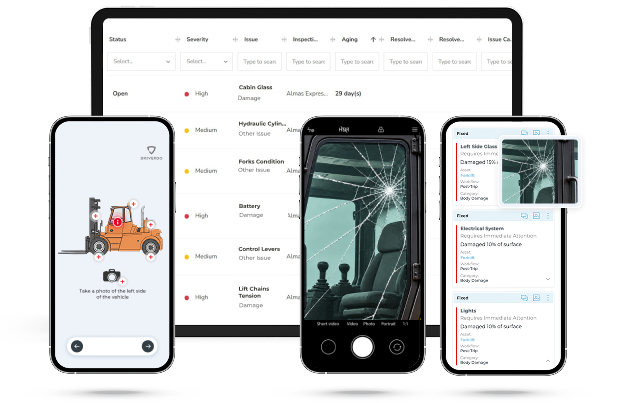
Driveroo app screens
Driveroo: inspection, compliance and maintenance automation
A guided process that runs to the repair.
Driveroo is built for inspection, compliance and maintenance of vehicles and equipment under DOT and OSHA rules. Each inspection is a guided workflow implemented for the asset, and every finding moves on its own: the defect routes to maintenance, can open a work order, keeps its repair history, and returns to the next driver or operator for sign off. Maintenance, costs, and compliance records share the same data.
Both capture the inspection data. The difference is the level of automation and process coverage: a calendar that encourages completed forms, or a guided process that runs to the repair. To see how other tools compare, compare DVIR software and compare pre-trip inspection apps.
Driveroo vs GoCanvas at a Glance
| Fact | GoCanvas | Driveroo |
|---|---|---|
| Starting price | $29 per user per month (Essentials), billed annually, three user minimum | $5 per asset per month (Essentials), annual contract |
| Pricing model and tiers | Per user. Essentials $29, Pro $39, and Max $49 per user per month, all billed annually. Analytics, custom integrations, and white label are add-ons with no published price | Per asset, unlimited users. Essentials $5 and Pro $7 per asset per month. Enterprise by quote. AI and telematics and TMS integrations on Enterprise. Discounts for annual payment, volume, and multi-year agreements |
| Free trial and contract terms | Free trial activated after a setup call; length not stated on gocanvas.com. Annual billing on every plan | No free trial listed on the pricing page; trials can be arranged with the sales team. Annual contracts; minimums apply. Payment terms can be negotiated |
| Setup model | Self-serve with guided options. The customer builds forms in the Basic or Advanced Form Builder, or converts a PDF with AI Auto-Build. Pro adds instructor-led onboarding; Max includes one custom form build | Concierge. Driveroo configures inspection workflows as part of the subscription. No self-authoring tool today. Typical time to live: 2 weeks |
| Hardware required | None | None. Works on the driver’s phone or tablet |
| Platforms and offline | iOS and Android apps, web client, and a Windows desktop app. Offline completion: yes; submissions upload on sync, automatically if Auto Sync is on | iOS and Android apps, plus web. Offline inspections: yes, with automatic upload on reconnect as an option |
| Ratings (G2 / Capterra) | 4.3 (77 reviews) / 4.4 (209 reviews). Checked November 10, 2026 | 4.9 (45 reviews) / 4.8 (23 reviews). Checked November 4, 2026 |
| Best for | Businesses that want a job calendar for dispatching forms to field crews, with branded PDFs across many field processes | Fleets and equipment operations under DOT and OSHA rules that want inspection, compliance and maintenance automated in one process, priced per asset |
Where Driveroo and GoCanvas Differ
| Feature | GoCanvas | Driveroo |
|---|---|---|
| The inspection | ||
| What the driver sees | Screens of form fields built in the GoCanvas builder: checkboxes, single choice, Pass/Fail, photo, and signature fields, with reference images where the builder adds them | The exact asset on screen: images of the vehicle or equipment with each inspection point marked, mixed with icons, text, example photos, and video as the fleet prefers |
| Training during the inspection | Static text and reference images placed in the form by its builder; reference documents and attachments on Max. GoCanvas’s form builder guides describe no instructional video inside the form and no training or course module | Training sits at each inspection point: example photos, images of the asset, and video instructions, with added guidance for new hires or for drivers who often miss a defect |
| Building and changing the inspection | The customer builds and maintains each form. AI Auto-Build turns an uploaded PDF into a draft form. Max includes one custom form build; further builds are available from GoCanvas services | Driveroo defines and implements every workflow, with embedded training and all logic paths, as part of the subscription, and makes changes on request |
| How the inspection branches | Field and screen conditions show or skip content based on an earlier answer in the same submission, with And and Or rules. GoCanvas advises keeping conditions on one field or screen to a minimum and testing before publishing | The workflow can branch on a defect, its severity, or data entered: adding steps or instructions, or sending the driver down a different path. Critical points and required photos cannot be skipped |
| How the inspection adapts | Conditions read answers inside the submission. A dispatch can prefill fields before the job. GoCanvas’s conditions guides describe rules on earlier answers only, none on the driver’s experience, the asset’s defect history, or weather | Assembled when the inspection starts, for the driver, the asset, and conditions: added guidance for a new hire, a reminder for a driver who often misses a defect, a chain check only on mountain routes |
| Defects and maintenance | ||
| From failed item to repair | On the Max plan, a Pass/Fail field opens a Follow-Up Task that the field user assigns to themselves or a teammate, with a due date, tracked on a Follow-Ups page. The assignee closes it with a signature, comments, and up to 10 photos. The Follow-Up form cannot be customized, so it records no parts, labor, or cost | Each failed point becomes a defect, routed to maintenance on submission by severity, issue, or asset type. On Pro it can become a work order with the driver’s photos and video, approval rules, a labor clock, and third-party estimates |
| Earlier defects at the next inspection | A new submission starts from the form. GoCanvas’s Follow-Up and submission guides describe no step that brings a vehicle’s open or repaired issues into a new inspection | Each prior defect and its repair appear at the related inspection point, with that item’s history. The driver accepts or rejects each repair, documented by signature |
| Vehicle records and maintenance | Project View organizes work by customer, project, and site; GoCanvas’s guides describe no vehicle or equipment register and no cost per asset. Repeat Dispatch resends a form on calendar dates (daily, weekdays, monthly, or yearly), not tied to an asset or to hours or mileage | Each asset keeps its inspection, defect, and repair history. Pro adds a planned maintenance calendar on time, hours, mileage, or a mix, with the due date adjusted from readings captured during inspections, and from telematics on Enterprise |
| Missed inspection notice | Dispatches put a form on the calendar, once or repeating. The date range is a calendar slot, which GoCanvas says has no bearing on when the work is due. GoCanvas’s dispatch guides describe no overdue alert, and GoCanvas has pointed customers who asked for one to a custom integration | Alerts by SMS, push, or email when a scheduled inspection is not done within its window, and a yard geofence flags a vehicle that leaves without one |
| Data, access, and cost | ||
| Reporting and analytics | Every plan has an account dashboard and admin reports on users, submissions, and follow up tasks, plus CSV export by form version. Dashboards and trend reports come from GoCanvas Analytics, an add-on set up with GoCanvas consultants, with no published price | Working dashboards on every plan for defects, repairs, parts, labor, and costs per asset, across the fleet, and by asset type; Pro adds custom dashboards. Every data point, including user, time stamp, duration, and location, can feed reports. Office AI analyzes defect patterns and costs (Enterprise) |
| Roles, teams, and locations | Seven fixed roles, from Company Administrator to Mobile Only User. User groups assign forms by location or region. Departments on Max separate forms, data, and users, with a role per department. Custom roles are not available | Permissions by role, team, and location. Any number of roles, including custom versions, each with its own permissions over what users can do on mobile and on the web |
| Telematics and TMS | No telematics or TMS connector is named. Connections run through Zapier, Power Automate, webhooks, the API, or GoCanvas Integrations, a paid connector service for 1,000+ apps | On Enterprise: integrates with Samsara, Geotab, Azuga, Motive, and Verizon Connect, runs inside the Samsara and Geotab driver apps, and integrates with Trimble for carriers that run a TMS |
| Cost of adding drivers | Each driver is a user, at $29 to $49 per month depending on plan, billed annually, with a three user minimum | Priced per asset with unlimited users, so adding drivers or operators adds no cost |
| AI | ||
| AI for drivers | GoCanvas’s guides describe no AI inside the inspection. Photo analysis and conversational forms were previewed on the 2026 roadmap | An AI briefing before and during each inspection summarizes prior results, recommends what to check, and coaches with telematics data such as speed violations. Driver AI can add instructions, automations, and logic routing (Enterprise) |
| AI for managers and maintenance | AI Auto-Build converts PDFs into forms for the people who build them. Conversational analytics was previewed on the 2026 roadmap | Scans inspection photos for unusable images and for damage, defects, and possible defects, analyzes defect patterns and maintenance costs, tracks compliance, and loads data from outside systems (Enterprise) |
What both do
Both platforms complete inspections offline, capture photos, video (GoCanvas from Pro), and signatures, assign inspections to users ahead of time, and produce a report for each inspection that can be exported or printed.
How Each Platform Supports DVIR and Forklift Inspection Rules
Under 49 CFR 396.11, a driver reports defects at the end of each day’s work, the carrier certifies that each safety defect was repaired or that repair is unnecessary, and the report is kept for three months. Under 49 CFR 396.13, the next driver reviews the last report before driving. Under 29 CFR 1910.178(q)(7), a forklift is examined at least daily and taken out of service if a condition affects safety. 49 CFR 396.11 49 CFR 396.13 29 CFR 1910.178(q)(7)
Getting the report to the carrier.
GoCanvas and DriverooBoth work offline and can upload automatically when coverage returns, though a force closed GoCanvas app holds the submission until reopened.
Who owns the defect, and the repair record.
GoCanvasIn GoCanvas, a failed item is an answer on the form, so the repair depends on the driver. On Max, the driver opens a Follow-Up Task, chooses who fixes it, and sets the due date; on other plans, the failure stays in the PDF unless the form sends it to a supervisor. Skip the task, and nothing routes the defect to maintenance. The assignee closes it with a signature, comments, and photos, tied to that submission, not the vehicle, with no parts or labor.
DriverooIn Driveroo, rules set each defect’s severity and route it to maintenance, mechanics decide on the repair, and the fix is recorded against the original defect with parts, labor, and photo proof, or marked Acknowledged when none is needed.
Where Driveroo is stronger: the repair decision stays with the carrier, fully recorded.
The next driver’s review.
GoCanvasGoCanvas’s guides describe no step that shows the last report or its repairs inside a new inspection.
DriverooDriveroo shows each prior defect and its repair at the related point, and the driver accepts or rejects the fix with a signature.
Where Driveroo is stronger: the review is built into the inspection.
The daily forklift examination.
29 CFR 1910.178(q)(7)GoCanvasGoCanvas offers forklift checklists in its template library for each site to adapt.
DriverooDriveroo implements forklift workflows with images of the truck and embedded training, and its out of service status can block the next inspection on an unsafe truck.
Where Driveroo is stronger: the unsafe truck can be assigned out of service until the repair is recorded.
Keeping the records.
GoCanvasGoCanvas stores each submission as data and a PDF, with a log of edits, which is the minimum; nothing traces a defect from report to repair on the vehicle.
DriverooDriveroo keeps every report and data point, including user, time stamp, duration, and location, and can place any of it in reports and dashboards.
Compliance depends on how each carrier or employer follows the regulations and applies tools like GoCanvas and Driveroo; owning either platform does not by itself make an operation compliant. For the full rules, see DVIR rules in 49 CFR 396.11 and 396.13 and OSHA pre-operation inspection rules.
The same inspection in both tools
One Steer Tire With Exposed Cord, Two Workflows
On a morning walkaround, a driver spots exposed cord on the left steer tire. Tires are one of the parts a DVIR must cover. Here is how the finding moves through each platform.
In GoCanvas
- Open the dispatch.The DVIR form arrives as a daily repeat dispatch on the driver’s calendar, with the unit number filled in by the dispatcher, or the driver opens it from the forms list.
- Fail the tire item.On a form built with a Pass/Fail field on the Max plan, a Fail opens a Follow-Up Task. The driver describes the problem, picks who handles it, sets a due date, and adds photos.
- Sign and submit.The driver signs. Without coverage, the submission waits on the phone until it syncs, automatically if Auto Sync is on.
- PDF and data.Once synced, GoCanvas stores the submission and produces the PDF the form’s designer laid out, which can be emailed to the shop.
- Repair.The assignee replaces the tire and closes the Follow-Up Task with a signature, comments, and photos. The Follow-Up form cannot be customized, so parts, labor, and cost are not recorded.
- Next driver.The next driver opens a new copy of the DVIR form. GoCanvas’s guides describe no step that brings the earlier failure or its repair into it.
In Driveroo
- Briefing.Where enabled, the AI briefing summarizes the truck’s recent inspections and points out what to watch.
- Inspect the tire.The steer tire appears on an image of that truck. When the driver fails it, rules set the severity and issue type, and the workflow requires photos before it moves on.
- Document it.The driver snaps a photo or records a short video of the tread, adds a comment by voice-to-text, and signs.
- Route and hold.On submit, maintenance is alerted by severity, issue, or asset type, and, where configured, the truck goes out of service.
- Work order.On Pro, a work order opens automatically or after manager review, with the photos and video attached.
- Repair recorded.The mechanic sees the parts needed and records the new tire, labor, and photo proof against the original defect on their mobile device, and the record and cost join the truck’s history.
- Next driver signs off.At the steer tire, the next driver sees the defect, the repair, and the item’s history, then accepts or rejects the fix and signs.
Worked pricing example
What 50 Vehicles Cost per Year
List prices for 50 vehicles and 50 drivers who each complete a daily DVIR, on annual billing. GoCanvas arithmetic: price × users × 12 months. Driveroo arithmetic: price × vehicles × 12 months.
How each one charges
GoCanvas: per user, billed annually, three user minimumDriveroo: per asset, unlimited users
Examples from the comparisonGoCanvas bills at least three users.
| Capability level | GoCanvas | Driveroo |
|---|---|---|
| Inspections and reports | Essentials: $29 × 50 × 12 = $17,400 | Essentials: $5 × 50 × 12 = $3,000 (annual payment discount available) |
| Adds video capture | Pro: $39 × 50 × 12 = $23,400 | Included on Essentials |
| Adds failed item follow up | Max: $49 × 50 × 12 = $29,400 (Follow-Up Tasks) | Included on Essentials ($3,000): defects routed to maintenance and resolved directly by a manager or mechanic. Pro: $7 × 50 × 12 = $4,200 adds the work order workflow and planned maintenance |
| Adds dashboards and trend reports | Analytics add-on: quote required | Dashboards on every plan; custom dashboards on Pro ($4,200) |
| Adds outside system connections | GoCanvas Integrations or Custom Integrations: quote required | Enterprise: quote required (telematics and Trimble integrations, AI, vendor management, and purchase orders) |
The math changes when a few people inspect many assets. A yard where 8 operators inspect 50 machines pays $29 × 8 × 12 = $2,784 a year on GoCanvas Essentials, below Driveroo Essentials at $3,000 for the same 50 assets. On Max, which adds Follow-Up Tasks, the crossover is 5 users ($2,940). Those GoCanvas prices buy forms, PDFs, and tasks; dashboards and integrations are quoted separately. GoCanvas bills annually with a three user minimum. Driveroo requires annual contracts, minimums apply, and it includes unlimited users. Neither price includes telematics hardware, and Driveroo’s telematics integrations require Enterprise.
Switching From GoCanvas, and Running Both
Moving from GoCanvas to Driveroo.
- Step 1Export CSV by form and version, PDFs, or through the API
- Step 2Driveroo’s concierge team loads the data and converts the templates
- Step 3Typical time to live: two weeks
GoCanvas exports submissions to CSV by form and version, keeps a PDF of each, and offers an API for bulk access. Driveroo customers have moved from GoCanvas, and Driveroo’s concierge team loads their GoCanvas data from those exports or through the API. In past migrations, the team has also converted customers’ GoCanvas templates into Driveroo inspection workflows, as part of the subscription. Typical time to live is two weeks.
Running both.
Companies might have GoCanvas for customer facing paperwork that is dispatch-driven, such as quotes, invoices, and service tickets with a branded PDF. For vehicles and equipment inspection and maintenance, the two overlap. Driveroo also runs safety, quality, and work instruction workflows built on ROO.AI, priced per workflow, in bundles, or per user, which makes Driveroo a fit for departments and job sites where Driveroo workflow automation is an advantage. Neither vendor lists a direct integration between GoCanvas and Driveroo, so each keeps its own records. On Enterprise, Driveroo integrates with Trimble for carriers that run a transportation management system.
What Reviewers Say
GoCanvas
G2 4.3 (77 reviews)Capterra 4.4 (209 reviews)
- Quick to fill out in the field.Capterra reviewers score ease of use 4.4 and value the shift from paper to phone, including offline entry from the road.
- Data goes in more easily than it comes out.One Capterra reviewer calls GoCanvas a data collection tool that cannot do even basic analysis, another says reporting means reading rows of data, and a G2 reviewer misses a dashboard for tracking status. Others say PDF layouts take repeated testing, and some changes need GoCanvas programmers.
- Speed and sync on some devices.Recent Capterra reviews describe a slow app that crashes or glitches, and G2 reviewers mention crashes on some phones and assessments that never upload when the user forgets to sync.
Driveroo
G2 4.9 (45 reviews)Capterra 4.8 (23 reviews)
- A responsive team.Capterra reviewers give Driveroo’s customer service a 5.0 and describe quick, helpful answers.
- Fitted to how the fleet works.A Capterra reviewer says Driveroo shaped the software around the fleet’s existing processes.
- Android and navigation could be smoother.Some reviewers ask for a better Android experience and simpler navigation, and one wants live chat.
Frequently Asked Questions
10 questions on pricing, repairs, reporting, integrations, and the DVIR and forklift rules.
Is Driveroo or GoCanvas the better DVIR and pre-trip inspection app for fleets that want inspections tied to maintenance?
For DVIR and pre-trip inspections tied to maintenance, Driveroo is built for that link. It turns each failed point into a defect, can route it to maintenance on submission, can open a work order on Pro, and records the repair against the original defect, with per asset pricing and unlimited users. GoCanvas, owned by Nemetschek, works as a job calendar for filling out forms, suited to businesses that build their own forms for many field processes and dispatch them to crews; failed items can create Follow-Up Tasks on its Max plan at $49 per user per month. Both capture inspections offline with photos and signatures.
How much does GoCanvas cost compared with Driveroo?
GoCanvas lists Essentials at $29, Pro at $39, and Max at $49 per user per month, billed annually with a three user minimum; Analytics and Custom Integrations are quoted add-ons. Driveroo lists Essentials at $5 and Pro at $7 per asset per month on annual contracts, with Enterprise by quote. For 50 vehicles and 50 drivers inspecting daily, GoCanvas Essentials comes to $17,400 a year and Driveroo Essentials to $3,000. With 8 users and 50 assets, GoCanvas Essentials comes to $2,784.
Can GoCanvas and Driveroo turn a failed DVIR item into a repair?
Driveroo, yes; GoCanvas, as a task the driver creates. On every Driveroo plan, each failed point becomes a defect with a severity and issue type, routed to maintenance and resolved by a manager or mechanic; Pro adds the work order workflow with photos, video, and a labor clock. GoCanvas, on the Max plan, opens a Follow-Up Task from a Pass/Fail field that the driver assigns with a due date, and the assignee closes it with a signature, comments, and photos; parts, labor, and cost per vehicle are not recorded. Under 49 CFR 396.11, the carrier certifies each repair before the vehicle runs again.
Do GoCanvas and Driveroo show earlier defects to the next driver?
Driveroo, yes; GoCanvas, its guides describe no such step. In Driveroo, each prior defect and its repair appear at the related inspection point with that item’s history, and the driver accepts or rejects each repair with a signature. A new GoCanvas submission starts from the form rather than the vehicle’s open or repaired issues, so the last report is read separately. Under 49 CFR 396.13, the driver reviews the last DVIR before driving.
Can GoCanvas and Driveroo report on inspection and repair trends?
Yes, though GoCanvas charges extra for it. GoCanvas plans include admin reports on users, submissions, and follow up tasks, plus CSV export; dashboards and trend reports come from GoCanvas Analytics, an add-on configured with GoCanvas consultants and priced by quote. Driveroo includes working dashboards on every plan for defects, repairs, parts, labor, and costs per asset and across the fleet, adds custom dashboards on Pro, and lets any recorded data point, such as user, time stamp, or location, feed a report.
Do GoCanvas and Driveroo connect to telematics and transportation management systems?
Driveroo, yes, on its Enterprise plan; GoCanvas, through connector tools. Driveroo integrates with Samsara, Geotab, Azuga, Motive, and Verizon Connect, runs inside the Samsara and Geotab driver apps, and integrates with Trimble for carriers that run a TMS. GoCanvas names no telematics or TMS connector; links to other systems run through Zapier, Power Automate, webhooks, its API, or GoCanvas Integrations, a paid service covering more than 1,000 apps.
Can GoCanvas and Driveroo set permissions by role, team, and location?
Yes, both do, with different flexibility. Driveroo sets permissions by role, team, and location, and supports any number of roles, including custom versions, each controlling what users can do on mobile and on the web. GoCanvas offers seven fixed roles, user groups that assign forms by location or region, and Departments on its Max plan that separate forms, data, and users, with a different role per department; custom roles are not available.
What happens in GoCanvas and Driveroo when a scheduled inspection is missed?
Driveroo alerts managers by SMS, push, or email when a scheduled inspection is not done within its window, and a yard geofence, using the phone’s location or telematics on Enterprise, flags a vehicle that leaves without one. GoCanvas puts inspection forms on a dispatch calendar, once or repeating, but the scheduled slot is not a deadline, and its dispatch guides describe no automatic overdue alert. Under 49 CFR 396.11, carriers must require drivers to report on each vehicle at the end of each day’s work.
How does a fleet move from GoCanvas to Driveroo?
Driveroo customers have made that move. GoCanvas exports submissions to CSV by form and version, keeps a PDF of each, and offers an API, and Driveroo’s concierge team loads that data and converts the fleet’s GoCanvas templates into Driveroo inspection workflows as part of the subscription, with a typical time to live of two weeks.
Do GoCanvas and Driveroo support daily forklift inspections under OSHA?
Yes, both do. GoCanvas offers forklift checklists in its template library for each site to adapt. Driveroo implements forklift workflows with images of the truck and embedded training, routes defects to maintenance, and a truck with an open safety defect can be assigned out of service until the repair is recorded. Under 29 CFR 1910.178(q)(7), a forklift is examined at least daily before use and kept out of service if the examination finds a condition that affects safety.
Watch a Failed Item Run Through to the Repair
Driveroo sets up the inspection workflows for your vehicles and equipment as part of the subscription, priced per asset with unlimited users.
© Driveroo 2026 · Asset and Fleet Management Software Privacy · Terms
This site uses cookies. We do this to remember your preferences so that we can improve our service. By using our site, you agree to our use of cookies.