
Buyer’s Guide · Trucking & Fleet · Updated 2026
Best DVIR Software in 2026: Top Truck Inspection Platforms Compared
Six platforms for the daily driver vehicle inspection report, compared across fourteen capabilities: how each one guides the driver through the walkaround, what happens after a defect is flagged, and where AI actually helps. Every mark is sourced from vendor documentation.
What Is DVIR Software?
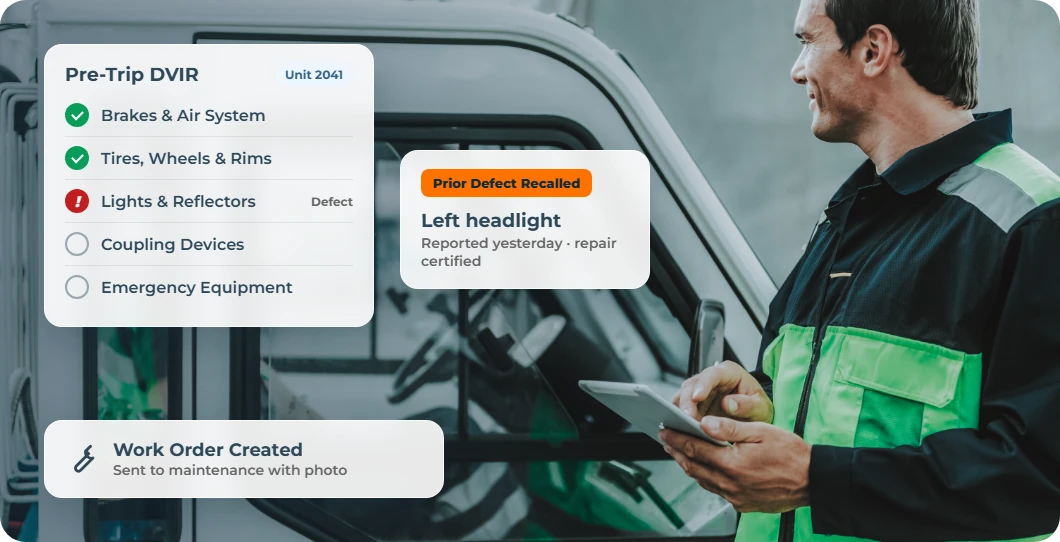
DVIR software puts the daily inspection a commercial driver must complete before and after a trip into a mobile app instead of a paper pad. A Driver Vehicle Inspection Report, or DVIR, documents whether a truck or trailer is safe to operate and records any defect a driver finds along the way. The strongest platforms carry that defect through to a mechanic, create work orders and track resolution, and keep every inspection on file for an audit.
The category goes by several names depending on who is searching. Fleet and safety teams tend to say DVIR software or electronic DVIR. Drivers and dispatchers often say pre-trip inspection app or post-trip inspection software. Some platforms market the same capability as truck inspection software or fleet inspection compliance software. All of these point to the same underlying job, which is replacing the DVIR paper checklist with something a driver completes digitally and a fleet manager can view.
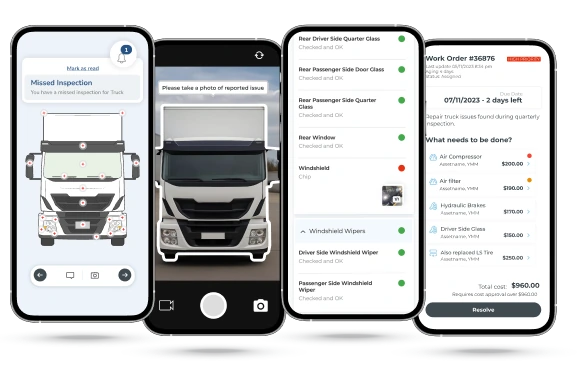
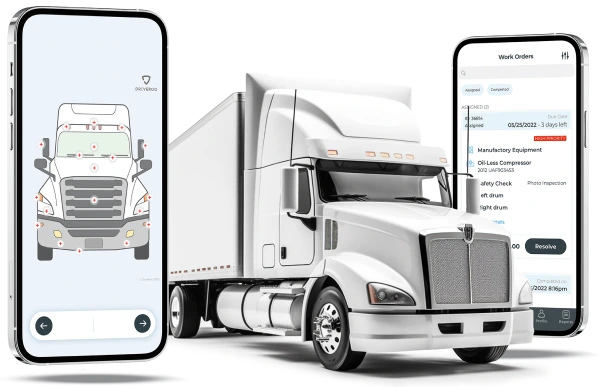
DVIR tools in this comparison trace back to three main origins, and origin still predicts what a platform does well. Samsara and Motive grew out of ELD and telematics hardware, where the DVIR was one screen inside a larger platform built around engine data, GPS, and hours of service. Fleetio, Whip Around, and Driveroo grew out of a software-first approach that started by automating the inspection and maintenance workflow itself on mobile devices, with no hardware requirement, and expanded from there into broader fleet management. J.J. Keller comes from regulatory compliance and driver training, with DVIR as one workflow inside a platform built around DOT and FMCSA recordkeeping rather than fleet operations software.
Under 49 CFR 396.11 and 396.13, a commercial motor vehicle driver operating in interstate commerce must prepare a DVIR at the end of each duty period and must review the prior report before the next trip. On March 23, 2026, an FMCSA final rule took effect explicitly authorizing electronic DVIRs, closing any remaining ambiguity about whether a digital report satisfies the requirement. A digital record does not change what the regulation requires, but FMCSA DVIR compliance software gives a fleet a searchable trail that the inspection happened and that a reported defect was resolved.
Platforms Covered in This Guide
Fleetio
DVIR as part of broader software vehicle maintenance management
Samsara
ELD telematics needs with DVIR and maintenance added
Motive
ELD telematics needs with DVIR and maintenance added
J.J. Keller
Fleets on Encompass for DOT compliance that want DVIR in the same system
Whip Around
A forms inspection-first DVIR tool with maintenance layered on top
Driveroo
Software platform running visual guided DVIR and maintenance with AI
DVIR Software: Comparison at a Glance
Fourteen capabilities that decide whether an electronic inspection report actually closes the loop, from guided visual inspection points and pencil-whip prevention to proof that a flagged defect was repaired.
Driveroo publishes this guide and appears in the comparison. Every mark is drawn from vendor documentation and third-party material, including the marks that favor competitors, and the reasoning behind each one is recorded in a source and data log.
| Capability | ||||||
|---|---|---|---|---|---|---|
| FMCSA-Compliant Pre/Post-Trip DVIR | ✓ | ✓ | ✓ | ✓ | ✓ | ✓ |
| Visual, Asset-Specific Guided Points | – | – | – | – | – | ✓ |
| Conditional / Branching Logic | – | – | – | – | ◐ | ✓ |
| Photo & Video Defect Capture | ◐ | ✓ | ✓ | ✓ | ✓ | ✓ |
| Pencil-Whip Prevention (prior-issue recall) | – | ✓ | – | – | – | ✓ |
| Defect Resolution Verification | ✓ | ✓ | ✓ | – | ✓ | ✓ |
| Issue → Work Order Automation | ✓ | ✓ | – | – | ✓ | ✓ |
| Preventive Maintenance Scheduling | ✓ | ✓ | ✓ | ◐ | ✓ | ✓ |
| Parts & Warranty Management | ✓ | ✓ | – | ◐ | ◐ | ✓ |
| Embedded Training / On-Demand Tips | – | – | – | ◐ | – | ✓ |
| AI in Workflow | ◐ | ◐ | ◐ | – | ◐ | ✓ |
| Telematics / ELD Integration | ✓ | ✓ | ✓ | ✓ | ✓ | ✓ |
| Missed-Inspection Alerts & Dashboard | ✓ | ✓ | – | ✓ | ✓ | ✓ |
| Offline Mobile (iOS / Android) | ✓ | ✓ | ✓ | ◐ | ✓ | ✓ |
| Ratings (G2 / Capterra) | 4.6 / ~4.8 | 4.5 / 4.5 | ~4.4 / 4.5 (1,687) | 4.7 (5) / 4 (1) | 4.8 / 4.7 | 4.9 (45) / 4.8 (22) |
Compare any platform against Driveroo
Pick a platform to see it side by side with Driveroo, row by row.
Capability
Driveroo
Key: ✓ = full built-in capability | ◐ Partial = limited, add-on, or inconsistently documented capability | – = not available or not confirmed as a primary capability, including where no sourced vendor or third-party documentation addressed the capability directly, rather than assuming it does not exist. In the Telematics / ELD Integration row, Samsara and Motive are marked full because each platform is itself an FMCSA-registered ELD rather than connecting to a separate one. AI in Workflow note: a Partial mark does not mean the same thing across vendors. Fleetio’s AI Service Advisor and Smart Uploads operate on back-office repair approvals and service documents. Samsara’s AI is documented across dashcam-based driver coaching, AI Fault Code Intelligence, and AI Invoice Scanning that auto-populates work orders, all of which analyze or accelerate maintenance data rather than guide the driver during the DVIR itself. Motive’s AI is similarly concentrated in dashcam coaching and driver safety scoring. Whip Around’s AI Inspections Pro, a paid add-on, reviews inspection photos after submission. None of these guide the driver in real time during the inspection walk-around, which is the distinction the full mark is reserved for. Photo & Video Defect Capture: photo capture is confirmed as a baseline, native-camera capability across all six platforms. Video attachment is confirmed for Whip Around and Driveroo; it is presumed available via native device camera for the others absent evidence otherwise, with one specific documented exception: Fleetio’s own help documentation states video upload "is not available for Inspection Items at this time," though video is supported elsewhere in the platform. Driveroo ratings are verified from live G2 and Capterra pages.
How to Choose the Right DVIR Software for Your Fleet
1
Every DVIR app can produce a compliant pre-trip and post-trip form, so treating them as interchangeable is where a lot of fleets go wrong. The first real question is whether the fleet wants to make a telematics or ELD hardware investment at all. Samsara and Motive build DVIR into a broader ELD and GPS platform, which means the fleet is buying in-cab hardware, engine sensor data, and a contract built around hours-of-service compliance. That data is genuinely useful, but it has a specific blind spot: an ELD reads engine performance and hours of service, not the physical condition of the vehicle. A bald tire, a broken taillight, a fluid leak, or a cracked frame are invisible to engine-based monitoring and surface only through an actual walkaround, whichever app the driver uses to record it. Fleets that don’t want to commit to a telematics contract, or that already run one and want a stronger dedicated inspection experience than a screen inside it, tend to look at software-only platforms such as Fleetio, Whip Around, or Driveroo instead, none of which require any hardware to get started but offer DVIR telematics integration.
2
The second question is scope. Some platforms stop at capturing the inspection itself, a completed checklist with a defect list attached. Others automate the full maintenance and repair process with issue to work order automation, converting that defect into a work order with parts, labor, and cost tracked through to close and, in the strongest cases, verifying the repair was actually made before the vehicle goes back into service, which is itself a DOT requirement. A smaller group goes further still, giving drivers broader digital tools beyond the DVIR itself, embedded safety training, incident reporting, and guided workflows for other frontline tasks. Deciding how far up that scope a fleet needs, now and in the future is critical to the evaluation.
3
The third question is usability, meaning how much the platform actively helps the driver in the moment to ensure speed and accuracy. Smart automation matters here. Does the app recall a defect flagged on a prior inspection and share that history with the next driver assigned to the same vehicle, rather than making every inspection start from a blank form? Does it guide a less experienced driver through what to check and how to check it, rather than presenting the same flat text list to everyone? AI plays a growing role in this question too, and it is worth distinguishing AI that helps the driver during the inspection itself from AI that only analyzes the data or automates paperwork in the back office.
DVIR Software: Vendor Snapshots
Overview: Fleetio is a cloud and mobile fleet management platform used by small and mid-sized fleets to manage maintenance, inspections, fuel, and vehicle records in one system. Its DVIR capability sits inside a general Inspections module rather than as a stand-alone product, and the company’s own materials describe the tool as producing FMCSA-compliant DVIRs accessible from anywhere, even areas without internet. Fleetio’s inspection workflow documentation describes a full resolution loop: a driver records a finding, the fleet manager schedules the repair, the repair is completed and recorded against the original inspection, and the driver confirms the issue is resolved on their next inspection. Fleetio’s Capterra profile reports Transportation, Trucking, and Railroad as its largest single industry segment among reviewers.
Best for: Fleets that want DVIR folded into a broader vehicle and equipment maintenance system rather than a stand-alone inspection app.
Key features
FMCSA-compliant DVIR with offline completion and automatic sync. Customizable inspection forms tied to reported defects and service entries. A documented resolution loop where a driver confirms a repaired defect on the next inspection. Failed items convert to issues and work orders inside the same platform. A dedicated Warranty Management module tracks standard and extended coverage, in-service and end dates, and flags warranty-eligible repairs on work orders. Integrations with GPS and telematics providers, including Samsara, for automated odometer and diagnostic data.
Limitation
Fleetio’s inspection forms use fixed item types such as pass/fail, dropdown, and meter entry, with post-submission workflow automations rather than conditional logic that adapts the form itself in real time, and there is no visual, asset-specific guided interface. Photo capture is standard; video is the one specific exception, explicitly not supported at the inspection-item level. Warranty Management specifically requires the Premium plan tier rather than being available at every subscription level.
Overview: Samsara is a connected operations platform built around ELD compliance, GPS tracking, AI safety cameras, and maintenance, with DVIR completed through the Samsara Driver App, a phone-based companion app rather than the in-cab hardware itself. The DVIR workflow supports offline completion, and surfacing unresolved previous defects during the next inspection so the following driver can verify they have been resolved before certifying the vehicle safe to drive. Beyond the DVIR itself, Samsara’s Connected Maintenance module provides native Work Orders that pull defects, fault codes, and scheduled maintenance into one record, Parts and Purchase Order management with low-stock alerts, and AI Invoice Scanning that auto-populates a Work Order’s tasks, parts, vendors, and costs from an uploaded invoice.
Best for: Fleets that need ELD, GPS, Dashcam video and want native maintenance platform and DVIR as part of their solution.
Key features
DVIR 2.0 with offline mode and automatic sync once reconnected, completed through the phone-based Samsara Driver App. Previous Defects recall shown to the next driver before certification. Driver and mechanic signature capture built into the DVIR record. FMCSA-registered ELD with HOS compliance in the same app. Native Work Orders, Parts and PO management, and a named Warranty Management feature that auto-checks coverage on a reported defect and tracks reimbursement, alongside AI Invoice Scanning for maintenance cost tracking.
Limitation
Samsara’s DVIR is a screen inside a much larger telematics and safety platform rather than a purpose-built inspection product, and there is no visual, asset-specific guided interface or conditional logic that adapts the inspection form itself. Its AI investment, including fault code intelligence and invoice scanning, is concentrated in back-office maintenance analytics rather than guidance delivered to the driver during the inspection walk-around. More broadly, the core architecture is built around engine and hours-of-service data captured through the ELD, which by design does not detect physical defects such as tire wear, fluid leaks, or lighting issues that only a visual walkaround surfaces.
Overview: Motive, the KeepTruckin successor, is an ELD and fleet safety platform built for US trucking, with DVIR completed through the phone-based Motive Driver App alongside GPS tracking, AI dashcams, and hours-of-service logging in the same companion app. Drivers can attach photos, add notes, and upload documentation on inspections. There is a defect-resolution loop: maintenance can mark a submitted defect as Corrected, and the driver reviews the correction and signs off in the app to acknowledge it. Before a shift, the app also blocks a driver from proceeding if the vehicle was previously marked Unsafe. Independent trucking-software roundups cite Motive’s DVIR, HOS, and IFTA tools as among the category’s most mature, but Motive’s own Help Center confirms it has no native parts or materials inventory feature, and no work orders.
Best for: Fleets that need ELD, GPS, Dashcam video and want native maintenance platform and DVIR as part of their solution.
Key features
Digital pre-trip and post-trip DVIR with photo-attached defect notes, completed through the phone-based Motive Driver App. A pre-shift blocking gate prevents use of a vehicle previously marked Unsafe until the defect is resolved. A documented resolution loop where maintenance marks a defect Corrected and the driver signs off to acknowledge it. Offline inspection completion with automatic sync. FMCSA-registered ELD with HOS and IFTA reporting. AI-powered dashcams and driver behavior coaching.
Limitation
A visual asset-specific guided interface is not available in Motive, and conditional or branching logic that adapts the form itself based on an answer was not confirmed. The pre-shift Unsafe block is a binary gate rather than a detailed prior-defect recall: it does not show the driver what the flagged issue was, so a driver still starts from limited information about what to check. Parts inventory is not a native capability and there are no native work order capabilities. Independent reviewers also note a split between strong software ratings on G2 and Capterra and notably weaker scores on Trustpilot and the Better Business Bureau, which reflect the contract and billing relationship rather than the DVIR tool itself. As with other ELD-first platforms, Motive’s core strength is engine and hours-of-service data, which does not by itself detect the physical defects, such as worn tires or fluid leaks, that a visual pre-trip walkaround is designed to catch.
Overview: J.J. Keller is a regulatory compliance and training company built around DOT and FMCSA rules, and its Encompass platform is the compliance-first entrant in this comparison. Encompass’s DVIR capability sits inside a Vehicle Maintenance module letting fleets schedule and track preventive maintenance and manage parts inventory and repair orders. An independent DVIR roundup names Encompass directly as the pick for compliance-first environments, distinguishing it from telematics-first platforms. Because J.J. Keller’s core business is DOT recordkeeping and compliance training rather than fleet operations software generally, its DVIR workflow is built directly around the regulatory structure this category exists to satisfy.
Best for: Fleets already standardized on Encompass for DOT and driver compliance that want DVIR handled inside the same regulatory system.
Key features
eDVIR built around 49 CFR 396.11 and 396.13 recordkeeping requirements. Vehicle Maintenance module with PM scheduling, parts inventory, and repair-order tracking. Encompass Asset Tracking with configurable ping frequency. DOT regulatory reference and driver compliance training content in the same platform. Violation and expiration alerts across the compliance suite.
Limitation
J.J. Keller’s DVIR capability sits inside a general DOT compliance platform, and it lacks a documented visual guided interface, conditional branching, or pencil-whip prevention feature such as prior-issue recall. No AI feature is described in any sourced J.J. Keller material, and public third-party review volume is thin, with G2 showing 4.7 stars from 5 verified reviews and Capterra showing a single review dated 2019.
Overview: Whip Around is a dedicated DVIR and fleet inspection app, with added maintenance management on top of that inspection core. Whip Around’s maintenance layer is more substantial than a simple inspection app: flagged defects can become work orders with parts added and automatically subtracted from inventory, and a corrected fault "requires a mechanic’s signature," provided as an e-signature in the app and attached to the asset’s service history. Whip Around also documents a direct integration partnership with both Samsara and Motive, syncing odometer, engine-hour, GPS, and fault-code data and grouping defects from either platform’s DVIR into a shared work order. See the full head-to-head: Driveroo vs Whip Around.
Best for: Fleets that want a forms inspection-first DVIR tool with maintenance and work orders layered on top, without committing to a full telematics or ELD platform of their own.
Key features
Digital pre-trip and post-trip DVIR and eDVIR forms customizable by vehicle type. Photo and video defect capture built into the inspection flow. Work orders created, assigned, and tracked from flagged defects, with parts added and deducted from inventory automatically. A mechanic e-signature required to certify a corrected fault, attached to the asset’s service history. Direct integration partnerships with Samsara and Motive for telematics and DVIR data.
Limitation
A visual asset-specific guided interface and a prior-defect recall shown directly to the driver during the inspection itself are not available; prior defects are shown as the last report before the inspection, not at the related item during it. A warranty management capability is not available. Deeper parts and inventory tracking sits behind a higher-priced tier than the base inspection product.
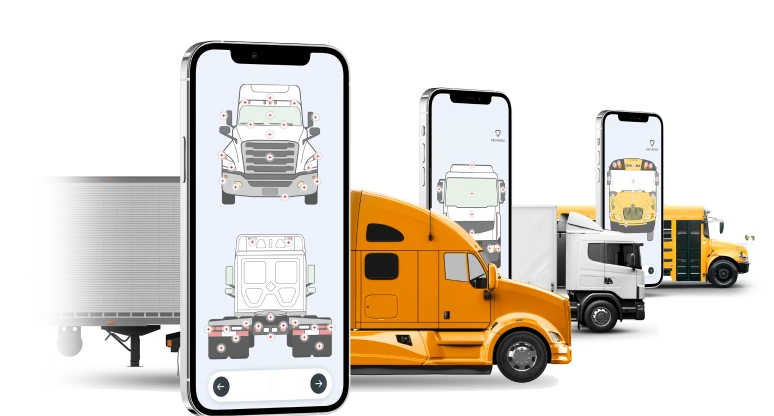
Overview: Driveroo, powered by ROO.AI, is a software-first solution and requires no hardware investment to deploy. The platform’s flexible workflows support 49 CFR 396.11 and 396.13 compliant inspection, and its guided, visual inspection system can improve speed and accuracy for inexperienced drivers. Inspection history is easily available on the mobile device and inspections show prior issues to reduce pencil-whipping. A flagged defect can auto-generate a work order and feed a preventive maintenance schedule, with parts, labor, repair costs, and warranty status are tracked against the asset. Embedding safety training content directly into daily inspections is a feature of the workflows. Along with conditional logic and AI guidance. Driveroo also positions its visual DVIR as a complement to, not a substitute for, ELD-centric platforms to ensure capture of physical defects such as tire wear, broken lights, and fluid leaks are not visible to engine-based monitoring and surface only through an actual walkaround.
Best for: Fleets that want to improve inspection speed and accuracy with AI guidance, automate the full maintenance process and additional safety and work processes in one tool.
Key features
Visual, guided DVIR interface with tap-and-go controls. Conditional-logic guidance that adapts the inspection in real time. Prior-issue recall built to reduce pencil-whipping and missed defects. Closed-loop DVIR to repair: automatic work-order generation from flagged issues, with parts, labor, and cost tracked per asset. Preventive maintenance scheduling by operating hours, mileage, or calendar date. Embedded safety training content delivered inside daily inspections. AI capabilities within workflows and for automations in maintenance, analytics and recording processes. Telematics integrations including Samsara, Azuga, Motive, and Verizon Connect. Works online and offline on iOS and Android.
Limitation
Driveroo lacks driver assignment offered in some other fleet management platforms. There is no current self-authoring tool for building new inspection workflows without Driveroo's concierge service, which configures workflows as part of the subscription. That makes it more suited to broader departmental or organizational rollouts than the smallest, single-machine, do-it-yourself deployments. The company reports that an AI-based self-authoring function is on the roadmap.
See how guided digital inspections work end to end: Driveroo DVIR software
Frequently Asked Questions
DVIR software is a category of mobile apps that let commercial drivers complete the Driver Vehicle Inspection Report required before and after a trip on a phone or tablet instead of paper, capturing defects, signatures, and a searchable compliance record automatically. It is also called electronic DVIR or eDVIR software, truck inspection software, and pre-trip or post-trip inspection software. Platforms covered in this guide include Fleetio, Samsara, Motive, J.J. Keller, Whip Around, and Driveroo.
The leading DVIR platforms for 2026 include Fleetio (DVIR folded into fleet maintenance), Samsara (DVIR built into a leading ELD, GPS), Motive (DVIR bundled with a top-rated ELD and real-time tracking), J.J. Keller (DVIR inside a DOT compliance and training platform), Whip Around (an inspection-first DVIR tool with maintenance layered on top), and Driveroo (a visual, guided inspection and maintenance platform with AI capabilities). The best fit depends on whether a fleet wants DVIR as a stand-alone tool, folded into an existing ELD, or as a broader frontline tool for safety, maintenance and work instruction.
They differ more than a shared compliance requirement suggests. Samsara and Motive grew out of ELD and telematics hardware, where DVIR is one screen inside a much larger hardware platform built around engine and hours-of-service data. Fleetio, Whip Around, and Driveroo grew out of a software-first approach to automating inspection and maintenance, with no hardware investment required. J.J. Keller comes from regulatory compliance and training. Scope is a second differentiator, ranging from a stand-alone inspection app to a platform that automates the full maintenance and repair process. Finally, AI is a newer differentiator, running from back-office fault codes, invoice processing, and dashcam coaching to AI-directed DVIR guidance built into the inspection itself.
Start with whether the fleet wants to make a telematics or ELD hardware investment at all, since that decision shapes which platforms are even in scope; an ELD reads engine and hours-of-service data but does not see a bald tire, a broken taillight, or a fluid leak the way a visual walkaround does. Then evaluate scope, meaning whether the platform simply captures the inspection or automates the full defect-to-repair process, including work orders and verifying that a flagged defect was actually fixed before the vehicle goes back into service, which the regulation itself requires. Finally, weigh usability: does the app recall a defect flagged on a prior inspection and share it with the next driver, and does its AI help the driver during the inspection or only analyze the data afterward?
Under 49 CFR 396.11, a driver operating a commercial motor vehicle in interstate commerce must prepare a written DVIR at the completion of each day’s work on every vehicle operated, listing any defect that would affect safety or cause a breakdown. Under 49 CFR 396.13, before operating the vehicle, the driver must review the last DVIR and confirm that any required repairs have been made and certified. Electronic DVIRs were explicitly authorized under an FMCSA final rule that took effect March 23, 2026.
An ELD or telematics requirement is difficult to replace with software, although software can integrate and enhance these investments. While most DVIR software is not designed to compete directly with a CMMS, some of the most advanced solutions like Fleetio and Driveroo can provide a significant portion of the CMMS footprint including preventive maintenance scheduling, work orders, parts, vendors, warranties and cost tracking across an entire maintenance program.
See it on your own trucks
Turn every driver inspection into a closed loop, from defect to certified repair
Get Live Demo© Driveroo 2026 · Asset and Fleet Management Software Privacy · Terms
This site uses cookies. We do this to remember your preferences so that we can improve our service. By using our site, you agree to our use of cookies.