
Driveroo vs Whip Around (2026): Static Forms vs Adaptive Inspections, Pricing and Fit
Last updated November 10, 2026. Pricing and ratings checked November 9, 2026.
Driveroo and Whip Around are both inspection-first platforms used by fleet managers and safety directors across a broad range of fleet types. Both run digital DVIRs, turn failed items into work orders, and start at $5 per asset per month. The deciding difference is how the inspection is built and operates. Whip Around uses static forms: the same cards, in the same order, for every driver of an asset. Driveroo has an adaptive inspection from a common base, shaped to the driver, the asset, and the day’s conditions.
Verdict
Whip Around is best for:
- Fleets that want to start small and run setup themselves, with a free plan for one asset, a 7-day free trial with no credit card, and monthly or annual payment.
- Teams that want to build and edit their own inspection forms, starting from a library of DOT template forms.
- Fleets with an in-house shop that want parts and inventory on the $10 Pro plan, plus a separately priced shop add-on for mechanic scheduling, cost-based approval routing, and quotes or invoices built from each work order.
Driveroo is best for:
- Fleets with new, rotating, or seasonal drivers, or inspection workflows driven by data and embedded logic and training where one fixed form cannot fit every driver and condition.
- Operations that want defects tracked point by point: prior defects shown at the part being checked, repeat reports linked to the first instance, and out of service units blocked from new inspections.
- Fleets that want work orders, a planned maintenance calendar, approval rules, and a labor clock at $7 per asset per month, with inspection workflows configured for them as part of the subscription. See the Driveroo eDVIR app.
The deciding difference
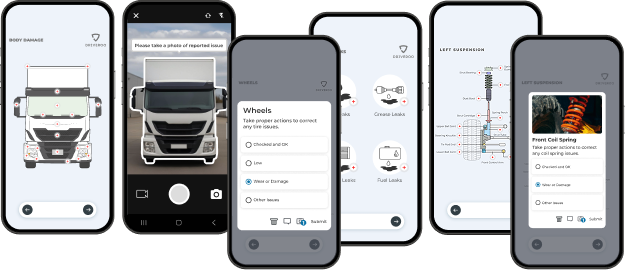 Driveroo app screens
Static Forms vs Adaptive Inspections
Illustration of a text form, not a screenshot
Whip Around: static forms
The same cards, in the same order, for every driver of an asset.
Whip Around began with a simple premise: make the daily walkaround quick on a phone. Its founder built it after seeing how long truck drivers at a New Zealand freight company spent on paper checks. A manager builds forms from cards of up to 10 check points and assigns them to an asset, and every driver of that asset sees the same form in the same order.
Driveroo app screens
Driveroo: adaptive inspections
Shaped to the driver, the asset, and the day’s conditions.
Driveroo’s goal was to bring speed and accuracy to the inspection and maintenance process through automation. It defines each inspection workflow once, with intuitive visuals, embedded training, and conditional logic. At run time, it assembles the inspection from that workflow for the driver, the asset, and the day’s conditions. A new hire gets extra instructions, a driver who often misses a defect gets a reminder, and a tire chain check appears in the mountains but not on a summer run across the plains.
Both catch defects. The question is whether one fixed form fits every driver and condition in your operation. To see how other platforms handle the same job, compare DVIR software.
Driveroo vs Whip Around at a Glance
| Fact | Whip Around | Driveroo |
|---|---|---|
| Starting price | $5 per asset per month (Standard) on annual terms; monthly payment available. Free Basic plan for 1 asset and 1 user | $5 per asset per month (Essentials), annual contract |
| Pricing model and tiers | Per asset. Basic free, Standard $5, and Pro $10 per asset per month. Fixed Unlimited is a flat rate by quote with a 12-month minimum. Add-ons priced separately: Wallet (per driver), AI Inspections Pro and FleetAI, and Shop Ops. Special pricing for trailers, machinery, and equipment | Per asset. Essentials $5 and Pro $7 per asset per month. Enterprise by quote, including AI. Discounts for annual payment, volume, and multi-year agreements |
| Free trial and contract terms | 7-day free trial, no credit card required. Pay monthly or annually; discounts for signing a contract; cancellation depends on contract terms. A license fee may apply for some fleet sizes | No free trial listed on the pricing page; trials can be arranged with the sales team. Annual contracts; minimums apply. Payment terms can be negotiated |
| Setup model | Self-serve form builder with a template library of DOT forms. The onboarding team helps rebuild existing paper forms | Concierge. Driveroo configures inspection workflows as part of the subscription. No self-authoring tool today. Typical time to live: 2 weeks |
| Hardware required | None. Integrates with more than 25 telematics and GPS platforms, including Geotab, Samsara, Motive, Verizon Connect, Azuga, and GPS Insight | None. Integrates with Samsara, Geotab, Azuga, Motive, and Verizon Connect, and runs inside the Samsara and Geotab driver apps |
| Platforms and offline | iOS and Android apps, plus web. Offline inspections: yes, synced when the phone is back in range | iOS and Android apps, plus web. Offline inspections: yes |
| Ratings (G2 / Capterra) | 4.8 (94 reviews) / 4.7 (577 reviews). Checked November 9, 2026 | 4.9 (45 reviews) / 4.8 (23 reviews). Checked November 4, 2026 |
| Best for | Fleets that want to build and edit their own static forms and start self-serve, with optional AI, shop, and document add-ons | Fleets that want inspections adapted to each driver, asset, and condition, with defects carried point by point to repair |
Where Driveroo and Whip Around Differ
| Feature | Whip Around | Driveroo |
|---|---|---|
| The inspection | ||
| Inspection UI | Text forms. Check items are listed as text on cards, with an optional icon per card | Flexible visualization of the exact asset: images of the vehicle or equipment, icons, and text, mixed on each screen as the fleet wants, so drivers see what they are checking rather than read a list |
| Guidance on screen | Optional help text on fields, plus Photo Guides on photo capture that show what to photograph, the angle, or a template to mark up. How the driver opens a guide is not documented | Asset-specific images of the vehicle or equipment, with each inspection point illustrated. Inspection points can include example images and videos, and a selection at an inspection point can branch to further questions or details |
| Workflow assembled at run time | The driver picks from the forms a manager has assigned to the asset. Changes by driver, weather, or location are not documented | Each workflow is defined once with embedded training and conditional logic, then assembled at run time. It can add instructions for new hires, remind a driver who often misses a certain defect, or change with conditions, such as a tire chain check in the mountains that never appears on a summer run across the plains |
| Inspection layout flexibility | Items are grouped into cards of up to 10 check points, and one Pass approves a whole card. Larger groups must be split across extra “Part 2” cards | Fully customizable layout with no limit on points, descriptions, or instructions per screen, and rapid pass and fail options applied wherever the fleet wants them |
| Logic inside the inspection | Cards answered in the order they appear. A failed item, or certain answers, require a photo or comment before the driver continues. Branching to different questions is not documented | Critical points and required photos must be completed before the driver moves on. Embedded logic can alter the inspection flow based on defects, severity, or data entered |
| Training inside the inspection | Optional help text on fields. Training content such as image galleries or video instructions inside the inspection is not documented | Image galleries, equipment photos, and video instructions embedded in the inspection, so a new driver learns each check while doing it |
| Defects | ||
| Prior defects for the next driver | Before starting, the driver sees the vehicle’s most recent DVIR and its repair status. The next driver’s sign-off is captured digitally | Each prior defect appears at the related item during the inspection, with that item’s history. The driver accepts or rejects each repair, and a configurable pre-briefing is documented by signature |
| Repeat defects | Each failed item creates a defect. Outstanding faults on the same asset are suggested when a work order is built; linking repeat reports to the original defect is not documented | Repeat reports are linked to the original defect. Managers and drivers see the history, and managers can open the first reported instance from the defects screen |
| Using an out of service unit | FleetAI add-on rules can mark an asset out of service. Blocking new inspections on that asset is not documented | Out of service status can block new inspections on the unit, because Driveroo assembles each inspection at run time |
| AI and video | ||
| Driver AI during the inspection | None documented. Whip Around states its AI makes no change to the driver workflow | An AI briefing before and during the inspection summarizes prior inspections, recommends what to check, and can use telematics data such as speed violations to coach the driver. Driver AI can also add automations, instructions, and logic routing to the inspection (Enterprise) |
| Office AI for managers and maintenance | Paid add-ons used from the manager dashboard. AI Inspections Pro reviews selected photos, comments, and form details after submission and suggests defects for a manager to confirm. FleetAI adds workflow rules and invoice and document scanning | Inspection reports and images scanned for unacceptable photos and compared for damage, defects, and possible defects; processing and loading data from outside systems; analyzing defect patterns and costs; and tracking compliance (Enterprise) |
| Video on a defect | Multiple clips of up to 10 seconds each when raising a defect, with audio, alongside photos | Unlimited photos and videos on the failed item with no length limit, and spoken notes captured in the video. Longer videos take more time to upload on slower connections |
| Maintenance and shop | ||
| Maintenance on the mid plan | Standard ($5) covers inspections and defects. Service programs, recurring work orders, and a basic approval step start on Pro at $10 per asset per month. Labor tracking, the shop calendar, and cost-based approval rules need the Shop Ops add-on | Essentials ($5) includes issue and repair management and work assignments. Pro at $7 per asset per month adds mobile work orders, a planned maintenance calendar with instructions, parts, and labor built into each job, approval rules, and a labor clock with pause |
| Parts and inventory | Included on Pro. A part added to a work order is subtracted from inventory automatically | Advanced parts with inventory on Enterprise, priced by quote |
| Shop add-on and outside repairs | Shop Ops, a separately priced add-on on top of Pro, adds a mechanic scheduler and work order board, approval rules by cost, asset, or team, labor clock in and out, and quotes or invoices built from each work order | No separate shop package. Pro work orders support third-party estimates from your own vendors. Vendor management, purchase orders, and invoice matching at the vendor level on Enterprise |
What both do
Both platforms alert drivers and managers when a scheduled inspection is missed, flag a vehicle that leaves without an inspection (Whip Around through connected telematics, Driveroo through a yard geofence that can use telematics or the phone’s location), and set an asset out of service when a safety defect is reported. Both also complete inspections offline, alert managers as soon as an item fails, take comments by voice-to-text, create work orders from failed items automatically on their maintenance plans, add outstanding faults on the same asset to a work order, schedule recurring maintenance by time, mileage, or engine hours, record each repair against the original defect, include unlimited users, keep inspection records well past the three-month retention period, and integrate with Samsara, Geotab, Motive, Verizon Connect, and Azuga.
How Each Platform Supports the DVIR Rules
Before driving, 49 CFR 396.13 requires the driver to be satisfied the vehicle is in safe operating condition and to review the last DVIR where one was required, and 49 CFR 396.11 requires the carrier to repair each safety defect, or certify that repair is unnecessary, before the vehicle is operated again. 49 CFR 396.13 49 CFR 396.11(a)(3)
Being satisfied the vehicle is safe.
Whip AroundWhip Around gives every driver of an asset the same form: cards in order, required photos, and no passing a failed item without a photo or comment.
DriverooDriveroo accomplishes the same by showing drivers the points to inspect, and it can adapt the check to the driver and conditions and open with an AI briefing.
Where Driveroo is stronger: a new driver or a mountain route gets the steps it needs.
Reviewing the last report.
Whip AroundWhip Around shows the driver the vehicle’s most recent DVIR and repair status before the inspection begins, and captures the next driver’s sign-off.
DriverooDriveroo also keeps the DVIR history available, but raises each prior defect at the related item during the inspection, shows that item’s history, and lets the driver accept or reject each repair, with the review documented by signature.
Where Driveroo is stronger: the review happens point by point, at the part being checked.
Repair before the vehicle runs again.
Whip AroundWhip Around routes the defect into a work order, and the mechanic marks it Corrected or No Correction Needed with an e-signature that stays on the asset’s record.
DriverooDriveroo routes the defect to maintenance on submission and records the resolution against the original defect. When a manager decides a defect needs no repair, the Acknowledged status keeps it on record and available for a later repair, while leaving it out of repair reports and costs. An out of service unit can be blocked from new inspections until it is repaired.
Where Driveroo is stronger: a deferred defect is never lost, and it stays out of repair costs until the carrier decides to fix it.
Whip Around handles this last requirement especially well. A mechanic’s e-signature with a Corrected or No Correction Needed status mirrors the certification the rule describes. Both platforms can set an asset out of service when a safety defect is reported; Whip Around does it through rules in its paid FleetAI add-on. Driveroo captures the mechanic’s identity on the work order resolution but does not record a signature.
Compliance depends on each carrier’s adherence to the regulations and how it applies tools like Whip Around and Driveroo. Owning either platform does not by itself make a fleet compliant. For the full rule, see DVIR requirements under 49 CFR 396.11.
The same inspection in both tools
One Bulging Steer Tire, Two Workflows
On a morning pre-trip, a driver finds a bulge in the sidewall of a steer tire. Tires are one of the parts a DVIR must cover. Here is how the defect moves through each platform.
In Whip Around
- Open the inspection.The driver selects the truck in the app, sees its most recent DVIR and repair status, and picks the pre-trip form.
- Fail the tire card.The driver marks the tire item failed. The app requires a photo or comment before moving on, and the driver can add short video clips of up to 10 seconds and a voice-to-text note.
- Sign and submit.The driver signs and submits. Without a signal, the report stays on the phone and syncs when coverage returns.
- Manager alerted.The failed item becomes a defect, and the manager gets a real-time alert. Where a FleetAI rule is set, the truck is marked out of service and the defect is assigned.
- Work order.On Pro, the failed item generates a work order for the shop, carrying the driver’s notes and photos.
- Repair certified.The mechanic replaces the tire, marks the defect Corrected, and signs in the app. The signature appears on the inspection report and the asset’s record.
- Next driver reviews.The next driver opens the app, sees the latest DVIR and the corrected status, and signs off digitally.
In Driveroo
- Briefing first.Where enabled, an AI briefing summarizes the truck’s recent inspections before the walkaround begins.
- Inspect the tire point.The steer tire appears on a visual screen for that truck. When the driver fails it, the next step asks for the photos the workflow requires, and a critical point cannot be skipped.
- Capture evidence.The driver adds photos and a short video, describing the bulge aloud on the recording, plus a voice-to-text comment, then signs the inspection.
- Alert on submit.Maintenance receives an alert based on severity, issue, or asset type as soon as the inspection is submitted, and the truck is set out of service.
- Work order.On Pro and Enterprise, the defect becomes a work order automatically with the driver’s comments, images, and video attached. A manager can also create it manually.
- Repair recorded.The resolver records the tire replacement in the app, linked to the original defect, with an audit trail from capture to repair.
- Next driver confirms.At the tire point, the next driver sees the prior defect, its resolution, and that item’s history, then accepts or rejects the repair. The signature documents the review.
Worked pricing example
What 50 Vehicles Cost per Year
List prices only, for a 50-vehicle fleet on annual terms. Arithmetic: price × 50 vehicles × 12 months.
With work orders and preventive maintenance
$1,800
less per year on Driveroo Pro than on Whip Around Pro, for 50 vehicles at list price
| Capability level | Whip Around | Driveroo |
|---|---|---|
| Inspections, defects, and reporting | Standard: $5 × 50 × 12 = $3,000 | Essentials: $5 × 50 × 12 = $3,000 (annual payment discount available) |
| Adds work orders and preventive maintenance | Pro: $10 × 50 × 12 = $6,000 | Pro: $7 × 50 × 12 = $4,200 |
| Adds parts and inventory | Pro: included in $6,000 | Enterprise: quote required |
| Adds AI | AI Inspections Pro or FleetAI add-on on Standard or Pro: price not published | Enterprise: quote required |
At the inspection level, the two cost the same. Once a fleet adds work orders and preventive maintenance, Driveroo Pro costs $1,800 less per year for 50 vehicles; Whip Around Pro includes parts and inventory at that price, which Driveroo reserves for Enterprise. Whip Around notes that a license fee may apply for some fleet sizes and offers discounts on contracts. Driveroo requires annual contracts, minimums apply, and it offers discounts for annual payment. Neither price includes telematics hardware. Both include unlimited users. AI costs extra on both: Whip Around sells it as add-ons, and Driveroo includes it in Enterprise.
Switching From Whip Around, and Where Each Fits With Other Systems
Moving from Whip Around to Driveroo.
- Step 1Export as CSV, Excel, PDF, or through the API
- Step 2Driveroo’s concierge team converts and loads the data
- Step 3Typical time to live: two weeks
Multiple Driveroo customers have moved from Whip Around. Whip Around exports inspection history, defects, and reports on assets, drivers, work orders, service schedules, and inventory as CSV or Excel files, and single inspection reports as PDF. Its REST API returns the same records as JSON. Driveroo’s concierge team converts the data to new adaptive inspection workflows and loads it as part of the subscription. Typical time to live is two weeks.
Where each fits with other systems.
Running both for the same vehicles is unlikely, since each covers inspections, defects, and work orders. Both can run inside the Samsara and Geotab driver apps. Whip Around also powers GPS Insight Inspect+ and feeds maintenance systems such as RTA and Trimble TMT. Driveroo fits fleets that run a transportation management system and want the inspection, compliance and maintenance layer filled alongside it, with an integration to Trimble and an open API for other systems, without repeating the fuel, driver, and cost records the TMS already keeps.
What Reviewers Say
Whip Around
G2 4.8 (94 reviews)Capterra 4.7 (577 reviews)
- Easy for drivers.Reviewers often say drivers and office staff learn the app quickly, and Software Advice scores ease of use 4.75.
- Service team.Many G2 and Capterra reviewers single out support staff by name for patient onboarding help. Software Advice scores customer support 4.79.
- Repeat defects and add-ons.Capterra reviewers ask that a defect already reported not be logged again when the next operator finds it, and that repeat reports roll into one repair. Others find the notification volume heavy, and Capterra’s review summary notes complaints about price brackets, add-ons, and cancellation.
Driveroo
G2 4.9 (45 reviews)Capterra 4.8 (23 reviews)
- Responsive support.Reviewers describe quick, helpful answers from the Driveroo team, and Capterra scores customer service 5.0.
- Fit to the operation.One Capterra reviewer credits the team with tailoring the software to how the fleet already works.
- Mobile polish.Some reviewers want a smoother Android app and easier navigation, and one misses live chat.
Frequently Asked Questions
10 questions on drivers, pricing, AI, and the DVIR rules.
Is Driveroo or Whip Around better for fleets with new or rotating drivers?
Driveroo is built for that case. It assembles each inspection at run time from a workflow with embedded training and conditional logic, so new hires can get extra instructions and a driver who often misses a certain defect gets a reminder. Its inspections show each point on an image of the asset, change the next step based on each answer, embed training images and video, and on Enterprise can open with an AI briefing on the unit’s recent inspections. Whip Around suits fleets whose drivers already know the walkaround and want a fast form, with optional Photo Guides on cards and an AI add-on that reviews photos for managers after submission. Both record the DVIR that 49 CFR 396.11 requires.
Do Driveroo and Whip Around offer a similar mobile interface for drivers doing inspections?
No. Whip Around uses text forms: check items listed on cards in a set order, with an optional icon per card and Photo Guides that show drivers what to photograph. Driveroo shows images of the exact asset, with each inspection point illustrated on the vehicle or equipment, mixed with icons and text as the fleet wants, and inspection points can include example images and videos. Both apps run on iOS and Android and complete inspections offline.
How much does Whip Around cost compared with Driveroo?
Whip Around lists Standard at $5 and Pro at $10 per asset per month on annual terms, with monthly payment available, a free Basic plan for one asset, and a 7-day free trial. Driveroo lists Essentials at $5 and Pro at $7 per asset per month on annual contracts, with Enterprise by quote. For 50 vehicles with work orders and preventive maintenance, Whip Around Pro comes to $6,000 a year and Driveroo Pro to $4,200. Whip Around Pro includes parts and inventory; Driveroo offers them, along with its AI, on Enterprise. Whip Around sells AI as separate add-ons.
Do Whip Around and Driveroo use AI to help drivers during vehicle inspections?
Driveroo does; Whip Around does not. Driveroo’s driver AI, part of its Enterprise plan, works before and during the inspection: its briefing summarizes prior inspections, recommends what to check, and can use telematics data such as speed violations to coach the driver, and it can add automations, instructions, and logic routing to the inspection. Whip Around’s AI works in the manager’s dashboard. Its paid AI Inspections Pro add-on reviews selected photos, comments, and form details after the driver submits and suggests defects for a manager to confirm, with no change to the driver’s workflow.
Do Whip Around and Driveroo show the last DVIR to the next driver before a trip?
Yes, both do. Whip Around shows the driver the vehicle’s most recent DVIR and its repair status before the inspection starts and captures the next driver’s sign-off digitally. Driveroo raises each prior defect at the related item during the inspection, shows that item’s history, and lets the driver accept or reject each repair, with a signature documenting the review. Under 49 CFR 396.13, the driver must review the last DVIR where one was required before driving.
Can Whip Around and Driveroo place a vehicle out of service after a failed DVIR?
Yes, both can. Driveroo sets an out of service status when a safety defect is reported, alerts maintenance as soon as the inspection is submitted, and can block new inspections on that unit until it is repaired. Whip Around does it through its paid FleetAI add-on, where a workflow rule marks an asset out of service when a defined condition occurs, such as a failed inspection on a chosen form. Under 49 CFR 396.11, the carrier must repair a safety defect, or certify that repair is unnecessary, before the vehicle is operated again.
Can Whip Around and Driveroo record that a DVIR defect does not need repair?
Yes, both can. Whip Around lets a mechanic or manager mark a defect No Correction Needed, with a mechanic e-signature where the form requires one. Driveroo gives managers an Acknowledged status that keeps the defect on record and available for a later repair, while leaving it out of repair reports and costs. Driveroo records the identity of whoever resolves the defect on the work order. Under 49 CFR 396.11, the carrier or its agent certifies that a defect was repaired or that repair is unnecessary before the vehicle runs again.
What happens in Whip Around and Driveroo when a driver skips a scheduled DVIR?
Both send alerts, and both can flag a vehicle that leaves without an inspection. Driveroo alerts when a scheduled inspection is not done within its window, by SMS, push, or email, and a yard geofence, using telematics or the phone’s location, flags a vehicle that leaves without one. Whip Around sends the driver a push reminder, emails managers who follow that driver, and, with Geotab or another connected telematics platform, alerts managers when a vehicle moves without an inspection. 49 CFR 396.11 requires every motor carrier to require its drivers to report.
How does a fleet move from Whip Around to Driveroo?
Multiple fleets have already moved from Whip Around to Driveroo. Whip Around exports inspection history, defects, and reports on assets, work orders, and inventory as CSV or Excel files, and its REST API returns records as JSON. Driveroo’s concierge team converts the data to new adaptive inspection workflows and loads it as part of the subscription, with a typical time to live of two weeks.
How do Whip Around and Driveroo fit with telematics and other fleet systems?
Both run inside the Samsara and Geotab driver apps. Whip Around connects to more than 25 telematics and GPS platforms, including Geotab, Samsara, Motive, Verizon Connect, Azuga, and GPS Insight, and feeds maintenance systems such as RTA and Trimble TMT. Driveroo integrates with Samsara, Geotab, Azuga, Motive, and Verizon Connect, has an integration with Trimble for carriers that run a transportation management system, and offers an open API for other systems.
See an Adaptive Inspection on Your Own Assets
Driveroo configures inspection workflows for you as part of the subscription. Typical time to live is two weeks.
© Driveroo 2026 · Asset and Fleet Management Software Privacy · Terms
This site uses cookies. We do this to remember your preferences so that we can improve our service. By using our site, you agree to our use of cookies.