
Buyer’s Guide · Fleet Operations · Updated 2026
Best Pre-Trip Inspection Apps in 2026: Top Platforms Compared
Five leading platforms for the daily walkaround, compared across sixteen capabilities — how each one guides the operator through the check, what happens after a defect is found, and where AI actually helps. Every mark is sourced from vendor documentation.

What Is a Pre-Trip Inspection App?
A pre-trip inspection app puts the commercial vehicle walkaround inspection an operator performs before a vehicle moves onto a phone or tablet. Buyers search for this category under several names including pre-trip inspection software or pre-trip inspection app, walkaround app, daily vehicle check app, CDL pre-trip app or vehicle inspection app. The driver works through the checkpoints, records what is wrong, attaches visual evidence, and signs the record. The strongest platforms carry that finding through to a mechanic, open a repair, and keep proof of the whole sequence.
What separates these products is not whether they can display a checklist. It is how they hold up under repetitive use by operators. The pre-trip is the single most repeated task in most fleets. The operator checks the vehicle before every shift, hundreds of times a year. On day one every app looks fine. By month 2 usability is what causes operators to quit using the app if it hasn’t already slowed adoption to the point that the project has failed.
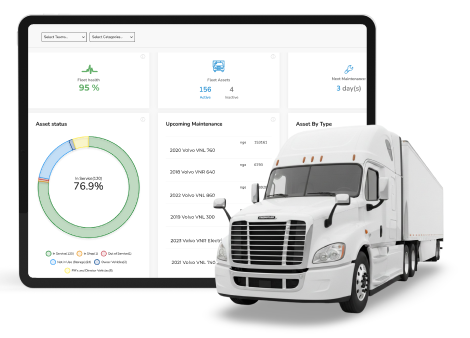
That repetition creates three competing demands. The operator needs the check to be genuinely fast, and for the app to help them instead of creating additional work. The maintenance team needs the inspection to be comprehensive, accurate and findings to arrive with enough detail to act on without an additional phone call. And the organization needs evidence that stands up later, because when an auditor, an insurer, or an attorney asks whether the check happened on a specific vehicle on a specific morning, they need a timestamped, location tagged, signed record. Platforms trade these three against each other in different ways, and that trade is the real basis for comparison.
The underlying requirement is set out in 49 CFR 392.7, which states that no commercial motor vehicle may be driven unless the driver is satisfied that a named list of parts and accessories is in good working order, covering service brakes, parking brake, steering, lighting devices and reflectors, tires, horn, wipers, mirrors, coupling devices, wheels and rims, and emergency equipment. Many operations run the same routine outside that rule as well, on light trucks, vans, buses, and yard equipment, because a check that catches a defect in the yard is far cheaper than one caught on the shoulder.
Platforms Covered in This Guide
SafetyCulture (now Mitti)
Teams that want a free or low-cost way to build their own checks and store them digitally
Fleetio
Fleets that want the walkaround inside a full maintenance system with in-house or outsourced repair control
Whip Around
Fleets that want a dedicated, inspection app with light maintenance layered on top
HVI
Cost-sensitive mixed fleets that want inspection and will trade off full maintenance capabilities or upgrade later
Driveroo
Operations that want to ensure usability and guide inspections for accuracy within a broad maintenance and AI platform
Pre-Trip Inspection Apps: Comparison at a Glance
Sixteen capabilities that decide whether a digital walkaround actually sticks — from guided visual checkpoints and defect capture to what the platform does after something fails the check.
Driveroo publishes this guide and appears in the comparison. Every mark is drawn from vendor documentation and third-party material — including the marks that favor competitors — and the reasoning behind each one is recorded in a source and data log.
| Capability | |||||
|---|---|---|---|---|---|
| Pre-Trip and Post-Trip Inspection Forms | ✓ | ✓ | ✓ | ✓ | ✓ |
| Visual, Asset-Specific Guided Points | – | – | – | – | ✓ |
| Conditional / Branching Logic | ✓ | – | – | ✓ | ✓ |
| Photo and Video Defect Capture | ✓ | ◐ | ✓ | ✓ | ✓ |
| Prior-Issue Recall at Inspection | – | ✓ | – | – | ✓ |
| Completion Evidence (time, GPS, signature) | ◐ | ✓ | ✓ | ✓ | ✓ |
| Defect to Work Order Automation | – | ✓ | ✓ | ✓ | ✓ |
| Repair Sign-Off | ◐ | ✓ | ✓ | ✓ | ✓ |
| Preventive Maintenance Scheduling | ◐ | ✓ | ✓ | ✓ | ✓ |
| Parts and Warranty Management | – | ✓ | ◐ | ✓ | ✓ |
| Third-Party Repair Routing (estimates and approvals) | – | ✓ | ◐ | ◐ | ✓ |
| Embedded Training and In-Flow Guidance | ◐ | – | – | – | ✓ |
| AI in Workflow | ◐ | ◐ | ◐ | ◐ | ✓ |
| Telematics and Odometer Sync | – | ✓ | ✓ | ✓ | ✓ |
| Missed-Inspection Alerts (real-time notification) | – | – | ✓ | – | ✓ |
| Offline Mobile (iOS / Android) | ✓ | ✓ | ✓ | ✓ | ✓ |
| Ratings (G2 / Capterra) | 4.6 / 4.6 | 4.6 / ~4.8 | 4.8 / 4.7 | – / 4.5* | 4.9 / 4.8 |
Compare any platform against Driveroo
Pick a platform to see it side by side with Driveroo, row by row.
Capability
Driveroo
Key: ✓ = full built-in capability | ◐ Partial = limited, add-on, tier-gated, or back-office version of the capability | – = not available, not documented, or not confirmed in sourced material. Several marks sit behind specific plan tiers. * HVI’s Capterra rating is from 2 reviews dated 2019–2020, with no G2 aggregate located; SafetyCulture ratings predate its August 2026 rebrand to Mitti. Driveroo ratings are verified from live G2 and Capterra pages.
How to Choose the Right Pre-Trip Inspection App for Your Operation
1
Every product in this comparison can put a checklist on a phone, so the first comparison is around usability, because it is the key factor that drives adoption and continued usage. There is a substantial difference in platforms that simply digitize the checklist and those that deliver visual, guided vehicle inspection software that shows drivers exactly what to inspect. Consider the features that will cause the app to be perceived as a time saver and not an extra chore such as single tap, group approve and swipe controls that reduce data entry and clicks. Look for recall and verified resolution of defects right in the inspection which significantly reduces repetitive and unneeded effort. Finally, consider the capabilities to ensure proper process and accuracy regardless of experience level such as embedded training, conditional logic that guides the inspection and required process steps.
2
Second, consider whether the inspection is an isolated process or an integrated part of a fleet maintenance program. How effectively does the platform deliver information to maintenance teams so that issues can be quickly triaged and service results in a first time fix. Does the platform support mobile work orders and can the work order process be automated? Can the repair process include outside service providers if used with full access to issue details, estimate and approval workflows all within the system, or are these things left to emails and phone calls? Are there capabilities for parts and warranty management within the repair process and analytics to manage costs? Also, the top platforms include operating-hour preventive maintenance automatically driven by inspection data that is tightly integrated in the work order process. Finally, consider the other adjacent operator processes you might want to automate including accident reporting, tracking tools, hazard and incident reporting on mobile, JSAs and training.
3
Third, be precise about AI, because every vendor in this market now uses the word. Most of it sits behind the operator rather than beside them: drafting a digital form from a spreadsheet checklist, reviewing photos after submission, scanning an invoice into a work order, suggesting which open issues a completed repair probably closed, or answering a manager’s question. All of that saves office time. It is a different thing from AI that reaches the person holding the phone while the vehicle is still in the yard, prompting them through a step or delivering a piece of micro training at the point of work. Ask each vendor to show exactly where their AI capabilities can be deployed in the platform, and score back office assistance and frontline in workflow guidance as two separate line items.
Pre-Trip Inspection Apps: Vendor Snapshots
Overview: SafetyCulture, known for years as iAuditor and rebranded as Mitti in August 2026, is a general inspection software tool rather than a vehicle product, and the walkaround enters it as one template among many available on its customer marketplace. Its distinguishing feature in this market is not the inspection engine, which is comparable to other form builders, but the free tier and the enormous public template library, which together put a first digital check in the hands of any supervisor without a purchasing process. Templates can have reasonably complex capabilities: logic fields trigger follow-up questions, require photo or video evidence on a given answer, require an action before an inspection can be marked complete, and notify named people based on a response. The platform’s Issues feature has been expanded to add safety processes, and it links to investigations and corrective actions, which can be used by safety managers to document their investigations and corrective action recommendations. Templates also carry a dedicated Instruction response type that holds how-to steps, diagrams, and PDF guides at the relevant question. What it does not have is a vehicle maintenance layer. An early access version of basic maintenance scheduling is available.
Best for: Teams that want a free or low-cost way to build their own inspections for equipment and site safety and store them digitally.
Key features
Free tier for small teams plus a very large public template library covering daily vehicle checks. Logic fields for branching questions, required media, required actions, and response-triggered notifications. Issues capture for hazards, near misses, and incidents, linked to investigations and corrective actions. Instruction response type carrying images, PDFs, and how-to steps at the question. Assets feature holding open and completed actions against a specific asset. Basic preventative maintenance scheduling by time interval or odometer and runtime reading, in early access by request. Separate Training module with courses and lessons. AI Assistant, Agents, and AI Issue Creation. Offline capture with automatic sync.
Limitation
SafetyCulture is a checklist and issue platform, and that is its ceiling as well as its strength. It has no vehicle maintenance layer, although there is an early access version of basic maintenance scheduling. Actions are general tasks so there is no repair record. There is no repair work order management with labor and cost, no parts or warranty tracking, and no route to an outside repair shop. It lacks a visual, asset-specific guided interface, and it does not recall a prior open defect to the operator during the check. The nearest equivalent is a manual lookup: an operator can open a list of actions raised at the same question in an earlier inspection. Its Analytics module surfaces missed and overdue checks on a dashboard, with no automated notification.
Overview: Fleetio is a fleet management platform. That framing shows in what it does best. Inspections can automatically open an Issue, that Issue can be added to a work order or service entry, preventive maintenance runs on runtime hours or mileage, parts inventory flows into work orders, and a dedicated Warranty Management module flags coverage before a repair is approved. Its outside shop capability is the deepest in this comparison, connecting to a repair network the company sizes at more than 110,000 providers, with line-item estimate approval, configurable auto-approval rules by cost or provider, and consolidated billing. Two inspection-side capabilities stand out as well. An open issue from a previous check is flagged on the specific inspection item, in the checklist view and again on the item itself, the next operator sees whether it remains open or has been resolved and can confirm or reject that resolution, and a required item carrying an open issue cannot be skipped. Separately, Fleetio records a GPS point for every individual item on a submission and flags submissions whose points suggest the form was not actually walked.
Best for: Fleets that want the daily walkaround folded into a full vehicle maintenance system, particularly those outsourcing most repairs and wanting tight control over what an outside shop is authorized to do.
Key features
Inspection forms with fixed item types including pass/fail, dropdown, meter entry, and tire readings, with offline completion and signature. Per-item GPS capture with automatic location exception flagging. Open issues flagged on the specific item in the checklist, with confirm or reject on the resolution. Workflows that create Issues automatically on item failure, convertible to work orders. Preventive maintenance by runtime hours, mileage, or date. Parts inventory and a Warranty Management module on the Premium plan. Outside shop network with line-item estimate approval and auto-approval rules. Telematics integrations including Samsara, Geotab, Motive, Verizon, and Caterpillar.
Limitation
Fleetio’s inspection forms use fixed item types with post-submission workflow automations rather than logic that adapts the form itself in the moment, and there is no visual, asset-specific guided interface. Video capture is a gap, explicitly unsupported at the inspection-item level. In-flow training or guidance for the operator is not part of the product, and its AI investment is concentrated on repair approval, document processing, and issue reconciliation in the back office. There is no missed-inspection alert. Overdue checks appear as a status in the app, and the only notification documented for a check that was actually missed is a weekly summary email. Several of the capabilities that make Fleetio strong here, including warranty tracking, the outside shop network, and inspection schedules themselves, require higher plan tiers than the entry product.
Overview: Whip Around is a dedicated inspection app in this comparison, built around the daily check first and extended into maintenance from there. The inspection experience is deliberately plain and fast: preloaded compliant forms or a custom builder, barcode and QR scanning to start a check on the right asset, photo or video on any failed item, voice-to-text notes, severity flags, and a form that auto-fills operator, vehicle, date, time, and location before closing with a signature. Photos can also be gathered through a separate Photo Card that collects up to twenty images at once, which is fast for the operator but produces untagged photo evidence with no defect indication attached to it. The app walks items in order and refuses an incomplete submission. Its maintenance layer is more substantial than a simple inspection tool: work orders carry parts that deduct from inventory automatically, and a corrected fault requires a mechanic e-signature that attaches to the asset’s service history. Missed check handling is a genuine strength, with a push notification to the operator and an email to following managers.
Best for: Fleets that want a dedicated inspection app with basic maintenance and work orders layered on top, without committing to a deeper fleet management platform.
Key features
Preloaded compliant inspection forms plus a custom form builder, with barcode and QR scanning to start a check. Photo and video capture, voice-to-text notes, and severity flags on failed items. Auto-filled operator, vehicle, date, time, and location, closing with a digital signature. Sequential item flow that blocks incomplete submission. Automatic work order creation from failed items, with parts deducted from inventory. Mechanic e-signature required to certify a corrected fault. Missed inspection reminders by push notification and manager email. AI Inspections Pro for automated review of inspection photos. Odometer reading by phone camera using optical character recognition. Integrations with Samsara, Motive, and Geotab.
Limitation
Whip Around presents the same text-based item list to every operator, with no visual, asset-specific guided interface, and conditional or branching logic in inspection forms was not confirmed. Prior open faults are visible only at the work order and manager level, not during the walkaround itself. There is no warranty tracking feature. Outside shops are handled by email notification and receive a link to view it, comment, change its status, and upload documents such as receipts, but there is no way for the shop to submit a priced estimate that the fleet approves or rejects. The bigger day-to-day friction is photo tagging. Images captured on a Photo Card carry no pass, fail, or defect marker, so they arrive at the shop untagged and a reviewer has to open each one to learn whether anything is wrong. Whip Around’s own materials describe this scenario and position the paid AI Inspections Pro upgrade as the fix. In-flow training is absent, and there is no inspection time AI guidance.
Overview: HVI, from JRS Innovation, is an inspection and maintenance solution aimed at heavy vehicle and equipment operators, and it packs an unusually wide feature set. Published pricing starts at $2.99 per user per month for inspection alone, but packages with competitive maintenance capabilities are priced at a similar level to the other vendors. Inspection is a drag-and-drop form builder with conditional logic to show or hide items, photo requirements, severity levels, and separate forms per vehicle type, with every submission carrying GPS location, timestamps, and digital signatures. A flagged defect can generate a work order, the corrective action log captures both operator and mechanic signatures, and preventive maintenance runs on date, mileage, or engine hours. Around that core sit modules for spare parts inventory with reorder forecasting, warranty tracking with per-part expiration and claim reporting, fuel management, tool tracking, purchase orders, and a safety module carrying hazard and near-miss reporting, incident investigation, and safety meetings.
Best for: Cost-sensitive mixed fleets that want inspection and will trade off full maintenance capabilities or upgrade later.
Key features
Drag-and-drop form builder with conditional show and hide logic, photo requirements, and severity levels, plus vehicle-type-specific forms. GPS location, timestamps, and digital signatures on every submission. Voice-to-text defect notes. Automatic work order creation from a flagged defect, with operator and mechanic signature capture. Preventive maintenance by date, mileage, or engine hours with due and overdue alerts. Spare parts inventory, warranty tracking with per-part expiration, purchase orders, and tool management. Safety module covering hazard and near-miss reporting, incident investigation, and safety meetings with multimedia content and quizzes. Missed inspection alerts and due-inspection reminders. Integrations including Samsara, Geotab, Verizon Connect, Webfleet, Zubie, and GPS Insight. Full offline capability on iOS and Android.
Limitation
HVI presents a text-based form rather than a visual, asset-specific guided interface, and outstanding faults are surfaced at the work order stage rather than to the operator during the walkaround. Its training and certification module tracks classroom records and certification expiry against the operator; no how-to content, media, or guidance delivered inside an inspection. On outside repairs, work orders can be assigned to outside contractors who are notified by email or app notification, and purchase orders can be delivered to vendors through an internal approval workflow, but there is no documented way for an outside shop to return a priced estimate for approval before work begins. There is no missed-inspection alert. A missed check is delivered as an emailed report after the fact, and the platform’s real-time notifications are documented for flagged defects and assigned work orders rather than for a skipped inspection. Public third-party review volume is extremely thin, with a Capterra profile showing 4.5 from two reviews dated 2019 and 2020 and no G2 aggregate located, so a buyer has very little independent validation.
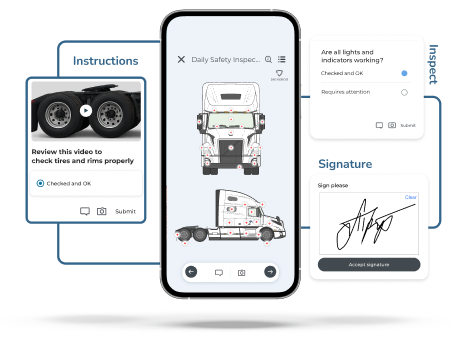
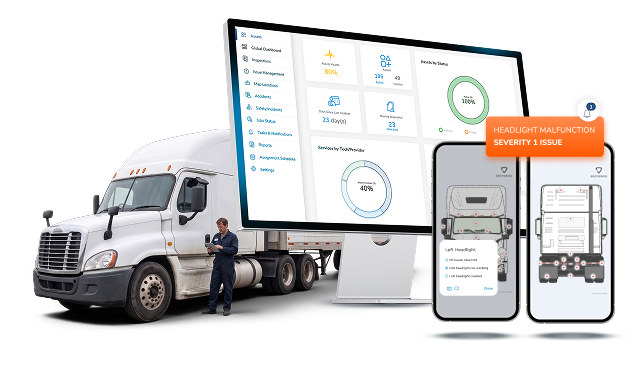
Overview: Driveroo, powered by ROO.AI, is a highly visual inspection and maintenance platform focused on usability, process automation and AI enablement. Its clearest differentiator is the interface. Instead of a text list, the app shows the operator the actual vehicle with the exact inspection points marked, using visuals matched to that asset type, with single-tap, swipe and group completion, voice-to-text, and image and video capture. That interface is configurable rather than fixed, spanning plain checklists, illustrated screens, real equipment photos, and work instructions with galleries and video, mixable inside one inspection. Setup is handled by a concierge service that builds each workflow to the customer’s equipment and process rather than handing over a template library. Prior issues are recalled inside the check to reduce rushing, and defect to work order automation carries a flagged item into an issue and then a work order with parts, labor, and warranty checked automatically. Work orders can be sent to outside repair providers for estimates and approved back inside the platform, with auto-approval thresholds. Beyond the vehicle, the same app carries incident and accident reporting, hazard capture, job safety assessments, a library of more than 200 toolbox talks, and inspections for tools, extinguishers, and other assets with serial and expiry tracking.
Best for: Operations that want the daily walkaround to be genuinely faster and more accurate for every skill level, want repair, safety, and other frontline processes automated in the same app, and want AI reaching the operator rather than only the back office.
Key features
Visual, asset-specific guided interface showing the exact vehicle and inspection points, configurable per asset type. Conditional logic that adapts the check in real time. Prior-issue recall shown to the operator during the walkaround. Single-tap, swipe and group completion, voice-to-text, and image and video capture, with location and hours attached automatically. Automatic work order generation with parts, labor, warranty check, and low-stock warnings. Preventive maintenance by mileage, hours, or date. Outside repair provider access with estimate request, approval, and auto-approval thresholds. Embedded micro-training and work instruction, job safety assessments, hazard reporting, incident and accident reporting, and a library of over 200 toolbox talks. AI agents delivering step-by-step prompts, reminders, and micro-training, plus AI conversion of existing forms and procedures. Missed inspection alerts with escalation until closed. Telematics integrations including Samsara, Azuga, Motive, and Verizon Connect. Works online and offline on iOS and Android.
Limitation
There is no self-service authoring tool for building new inspection workflows today. Driveroo configures workflows through a concierge service included in the subscription, which produces a closer fit to the customer’s equipment but makes the product a better match for departmental or organizational rollouts than for a single operator wanting to replace one paper pad this afternoon. The company reports that AI-based self-authoring is on the roadmap. Driver record management and assignment features found in some broader fleet management platforms are not part of the product.
See how the guided walkaround works end to end: Driveroo Pre-Trip Inspection App
Frequently Asked Questions
A pre-trip inspection app is a mobile tool that guides an operator through the walkaround performed before a vehicle is placed in service, replacing a paper checklist with a structured digital record. The operator works through the vehicle’s systems, flags anything defective, attaches photos or video, and signs the submission, which is stored with a timestamp and usually a location. Stronger platforms route the flagged defect to a mechanic, open a repair record, and document that the fix was completed. The category is also called pre-trip inspection software, a walkaround app, a daily vehicle check app, or vehicle inspection software.
The leading options for 2026 include SafetyCulture, now rebranded as Mitti, for teams wanting a free or low-cost way to build their own checks across every kind of inspection; Fleetio for fleets that want the walkaround inside a full maintenance system with strong control over outsourced repairs; Whip Around for a dedicated inspection app with basic maintenance layered on top; HVI for cost-sensitive mixed equipment fleets wanting inspection without maintenance or as a future upgrade; and Driveroo for operations that want a guided visual walkaround, native repair and safety automation, and AI that reaches the operator. The best fit depends on whether the priority is the lowest possible cost, the deepest maintenance system, or the fastest and most accurate experience for the person doing the check.
They differ far more than a shared checklist format suggests. The first difference is the operator experience: most present a flat list of items regardless of driver experience, while a few show the actual vehicle with the exact points marked and deliver guidance in place. The second is what the platform does after a defect is found, ranging from assigning a task, to opening a work order with parts and labor, to sending that work order to an outside shop for an estimate and approving it back in the same system. The third is breadth beyond the vehicle, since some platforms also carry incident reporting, hazard capture, safety training, and inspections for tools and equipment, while others stop at the vehicle. The fourth is AI, which in most products today drafts forms, reviews photos after submission, or answers a manager’s questions, and in a few reaches the operator during the check itself.
Start with usability, because it is the factor that is tested every single day. Check the features that will cause the app to be perceived as a time saver and not an extra chore such as single tap, group approve and swipe controls that reduce data entry and clicks. Look for the safeguards that hold accuracy up over time: an open defect from the previous shift surfaced during the current check, enforced item order, and location evidence captured with the submission. Next, evaluate the automation related to issue management. Note where the platform stops, checking whether repair work orders exist and are automated, whether it carries parts and cost, whether an outside shop can quote and be approved inside the system, and whether anything proves the repair happened. Then consider what else the same operator could be doing in the same app, including incident reports, hazard reports, and checks on tools and safety equipment. Finally, ask any vendor to show exactly how AI is used to enhance productivity — from back-office automation to AI guidance for frontline operators — rather than accepting AI as a single checkbox.
For commercial motor vehicles in interstate commerce, yes. Under 49 CFR 392.7, no commercial motor vehicle may be driven unless the driver is satisfied that a specific list of parts and accessories is in good working order, covering service brakes and trailer brake connections, the parking brake, steering mechanism, lighting devices and reflectors, tires, horn, windshield wipers, mirrors, coupling devices, wheels and rims, and emergency equipment. Drivers preparing to transport intermodal equipment have an additional inspection obligation under the same section. Many operations also run a daily walkaround on vehicles and equipment outside that rule, including light trucks, vans, buses, and yard equipment, because catching a defect before the vehicle moves is far cheaper than catching it afterward.
Rushing is a design problem more than a discipline problem, since the same check repeated hundreds of times invites shortcuts from anyone. Four software features address it directly. Surfacing an open defect from the previous check means the walkaround does not restart from a blank form and the operator has a specific thing to verify. Enforcing item order and refusing an incomplete submission removes the option of skipping to the end. Requiring photo or video evidence on a failed item makes a false pass harder to sustain. And capturing location data with the submission makes a check completed from the driver’s seat visible afterward, with some platforms recording a location point for every individual item and automatically flagging submissions whose points cluster too tightly to represent a real walk around the vehicle. Making the check genuinely faster and clearer matters just as much, because a tool that is slower than the paper it replaced will be worked around no matter what controls sit on top of it.
It depends on the platform and on how much maintenance the operation runs. A basic inspection app captures the check and stores the record, and anything beyond that needs a separate system. Several platforms go considerably further, offering preventive maintenance by mileage or engine hours, work orders with labor and parts, inventory that decrements automatically, warranty status against a repair, and cost tracking per asset, which is enough to serve as the system of record for many fleets. The capabilities most worth testing against an existing maintenance system are parts inventory depth, warranty handling, outside vendor management, and cost reporting, since those are where lightweight tools tend to stop. Buyers with a large in-house shop should evaluate maintenance depth as well as inspection capabilities.
Yes, many have offline completion, meaning an operator can finish and sign a check in a yard, a basement dock, or a rural route with no coverage and have it sync automatically once a connection returns. This matters more than it first appears, because an app that caches the form but fails when the operator tries to attach a photo or capture a signature will push crews back to paper within weeks. Worth testing during a trial: complete a full check in airplane mode, including photo capture, defect notes, and signature, then reconnect and confirm nothing was lost.
© Driveroo 2026 | Privacy | Asset and Fleet Management Software
This site uses cookies. We do this to remember your preferences so that we can improve our service. By using our site, you agree to our use of cookies.