
Driveroo vs Fleetio (2026): Inspection and Maintenance vs Fleet Management, Pricing Comparison
Last updated November 19, 2026. Pricing and ratings checked November 4, 2026.
Driveroo vs Fleetio for DVIR, pre-trip, and vehicle inspection apps: both are used by fleet managers and safety directors across a broad range of fleet types, support the pre-trip check under 49 CFR 392.7, record the DVIR under 396.11, and send defects to maintenance. Driveroo focuses on equipment inspection, compliance and maintenance, guiding each inspection and confirming each fix, from $5 per asset per month. Fleetio focuses on fleet operations, from acquisition and fuel to outside repair shops, replacement, and total cost.
Verdict
Fleetio is best for:
- Fleets that need one system for running fleet operations, with total cost of ownership, vehicle replacement planning, fuel card data, and recall alerts alongside maintenance.
- Fleets that send much of their repair work to outside shops and want estimates approved line by line, with billing consolidated through Fleetio’s Maintenance Shop Network.
- Teams that want to build and edit inspection forms themselves, start with a 14-day free trial, and go live without waiting on a vendor.
Driveroo is best for:
- Fleets that want a solution to automate inspection and maintenance, and the associated regulatory compliance requirements, in order to reduce risk in the inspection and repair loop through missed defects, unclear evidence for mechanics, or audit risk from poor documentation.
- Operations where drivers need visual, step-by-step guidance that adapts to each answer, and mechanics need video with spoken notes and voice-to-text comments from the inspection item itself.
- Rollouts across many sites or asset types that want inspection workflows configured for them as part of the subscription. See the Driveroo eDVIR app.
The deciding difference
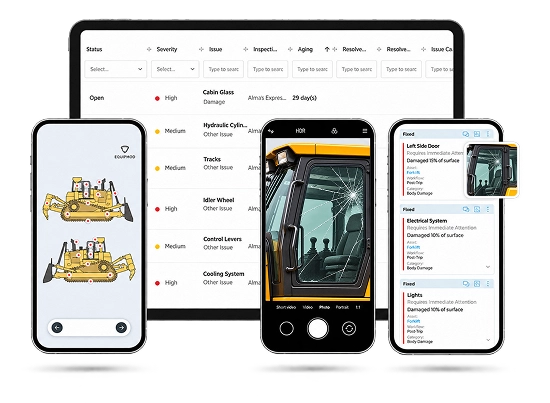 Driveroo app screens
Inspection and Maintenance vs Fleet Management
Illustration of a fleet system with modules, not a screenshot
Fleetio: fleet management
Inspections are one module feeding the vehicle record.
Fleetio focuses on fleet operations, from acquisition to disposal: vehicle records and assignments, fuel card data, recall alerts, expense and cost of ownership tracking, replacement planning, and a network of outside repair shops where estimates are approved line by line. Inspections are one module feeding that record. A failed item becomes an issue, and the issue stays open until a service entry or work order closes it.
Driveroo app screens
Driveroo: inspection and maintenance
The path from inspection to repair, in depth.
Driveroo has a deeper focus on the inspection, compliance and maintenance loop: the path from inspection to repair. Its inspection screens show the asset and visualize the points to check, change course based on each answer, and stop the driver from skipping critical points or required photos. Defects move into work orders with the driver’s photos and video attached, preventive maintenance runs on schedule, and the next driver acknowledges the fix.
The two overlap more than the labels suggest. Fleetio inspections flag open issues from earlier failures for the next driver, and Driveroo covers fuel, vehicle recalls, and asset assignment. The real question is where your operation needs depth: across fleet operations as a whole, or inside the daily work of inspecting and repairing equipment. To see how other platforms handle the same job, compare DVIR software or pre-trip inspection apps.
Driveroo vs Fleetio at a Glance
| Fact | Fleetio | Driveroo |
|---|---|---|
| Starting price | $4 per vehicle per month, billed annually, or $5 billed monthly (Essential) | $5 per asset per month (Essentials), annual contract |
| Pricing model and tiers | Per vehicle. Essential $4, Professional $7, Premium $10 per vehicle per month. Professional and Premium are billed annually only. Published rates assume a 5-asset plan band; price varies by fleet size range, contract term, and payment term. Essential covers up to 100 vehicles | Per asset. Essentials $5 and Pro $7 per asset per month. Enterprise by quote. Discounts for annual payment, volume, and multi-year agreements |
| Free trial and contract terms | 14-day free trial, no credit card required. Essential can be billed monthly; Professional and Premium are annual | No free trial listed on the pricing page; trials can be arranged with the sales team. Annual contracts; minimums apply |
| Ratings (G2 / Capterra) | 4.6 (193 reviews) / 4.7 (247 reviews). Checked November 4, 2026 | 4.9 (45 reviews) / 4.8 (23 reviews). Checked November 4, 2026 |
| Best for | Fleets that want one fleet management system covering cost, lifecycle, fuel, outside shops, and maintenance | Fleets that want the inspection, compliance and maintenance loop guided and automated across many sites and asset types |
| Setup model | Self-serve form builder, templates, and CSV data import. Optional implementation services, described by Fleetio as a 90-day program | Concierge. Driveroo configures inspection workflows as part of the subscription. No self-authoring tool today. Typical time to live: 2 weeks |
| Hardware required | None. Integrates with telematics providers, including Samsara | None. Integrates with Samsara, Azuga, Motive, and Verizon Connect |
| Platforms and offline | Fleetio Go for iOS and Android, plus web. Offline inspections: yes | iOS and Android apps, plus web. Offline inspections: yes |
Where Driveroo and Fleetio Differ
| Feature | Fleetio | Driveroo |
|---|---|---|
| The inspection | ||
| Guidance on screen | Text-based form items in a fixed order. Fleetio’s inspection form guide lists free text, pass/fail, dropdown, numeric, photo, and signature items; it lists no asset-specific reference images or illustrated inspection points | Asset-specific images of the vehicle or equipment, with each inspection point illustrated, alongside text and icon screens |
| Embedded training and onboarding | Optional written instructions per item, opened as a link | Image galleries, equipment photos, and video training embedded in the inspection, so new drivers learn what to check while they check it |
| Logic inside the inspection | Fixed item types: pass/fail, dropdown, numeric, photo, signature. If-then workflows run after submission | Dynamic logic changes the next step based on each answer. Critical points and required photos must be completed before the driver moves on |
| AI briefing and coaching during inspections | Open issues from earlier failures are flagged on the related item. Fleetio’s inspection guides describe no AI briefing or coaching; its AI Service Advisor works on issues and repairs | Not offered as a published feature |
| Evidence on a failed item | Photos and comments. Video upload is not available for inspection items | Unlimited photos and videos, with spoken notes captured in the video, plus comments by voice-to-text |
| Notice of a missed inspection | Due Soon and Overdue statuses, reminders to the vehicle operator, and an optional weekly summary email | Alerts when a scheduled inspection is not done within its window, by SMS, push, or email |
| Maintenance and back office | ||
| Repair tracking on the entry plan | Essential closes issues through service entries. Work orders start on Professional, with full work orders on Premium | Essentials includes issue and repair management and work assignments. Mobile work orders and preventive maintenance start on Pro |
| Where AI works | Maintenance and back office. AI Service Advisor prioritizes issues, drafts service work, and reviews repair approvals; Smart Uploads turns documents into records | Not offered as a published feature |
| Outside repair shops | Maintenance Shop Network: over 110,000 providers in the US and Canada, line-by-line estimate approval, and consolidated billing (Professional and Premium) | Point to point with your own vendors. Work orders from Pro support third-party estimates, approved at the total estimate level rather than line by line. No shop network. Vendor and purchase order management on Enterprise |
| Parts, inventory, POs, and warranty | Premium, at a published $10 per vehicle per month, with tire management and labor clock in and out | Enterprise, priced by quote |
What both do
Both platforms complete inspections offline, capture the driver’s signature, show open defects from earlier inspections to the next driver, record where each inspection took place, create an issue when an item fails, schedule preventive maintenance, track fuel, flag vehicle recalls, assign assets to drivers, and integrate with Samsara.
How Each Platform Handles DVIR Rules
Under 49 CFR 396.11, every defect a driver finds or is told about during the day’s work goes on the driver vehicle inspection report, which is due at the completion of that work. With an electronic DVIR, the report builds automatically from the day’s inspections as defects are recorded. The carrier repairs and certifies each safety defect before the vehicle runs again, and under 49 CFR 396.13 the next driver reviews the last report and signs it when defects were noted. 49 CFR 396.11 49 CFR 396.13
Finding defects in the listed parts.
49 CFR 396.11(a)(1)The ruleThe rule sets the scope rather than a checklist: defects in brakes, steering, lights, tires, mirrors, coupling devices, and the other parts listed in 396.11(a)(1). FMCSA guidance confirms the report does not have to name each part inspected.
FleetioFleetio presents those parts as form items the driver passes or fails.
DriverooDriveroo shows each point visually, adapts the next step to the answer, and holds the driver on critical points and required photos.
Where Driveroo is stronger: the guidance happens during the walkaround, which is where a missed defect begins.
Requiring drivers to report.
The ruleThe carrier must require its drivers to report.
FleetioFleetio marks scheduled inspections Due Soon or Overdue, reminds the operator, and can send managers a weekly summary.
DriverooDriveroo alerts managers when a scheduled inspection is not done within its window.
Where Driveroo is stronger: the manager hears about the gap when it happens, not in a weekly roundup.
Evidence for the repair decision.
The ruleThe carrier or its agent certifies that each defect was repaired or that repair is unnecessary.
FleetioFleetio carries photos and comments from the failed item into the issue.
DriverooDriveroo carries photos, video with the driver’s spoken notes, and voice-to-text comments into the work order.
Where Driveroo is stronger: a mechanic can see and hear the defect before deciding what the repair needs.
Next driver review.
FleetioIn Fleetio, open issues are flagged on the related item in the next inspection, and the driver confirms or rejects the resolution.
DriverooIn Driveroo, the driver can acknowledge or reject each resolved item, see the history for that specific item, and, where configured, receive open defects and their resolution as a pre-briefing, with the driver’s signature documenting the review.
Both platforms handle this step well.
Compliance depends on how a carrier follows the regulations and applies tools like Fleetio and Driveroo. Having either platform does not by itself make a fleet compliant. For the full rule, see DVIR requirements under 49 CFR 396.11.
The same inspection in both tools
One Cracked Mirror, Two Workflows
A driver finds a cracked rear vision mirror on a pre-trip inspection. Rear vision mirrors are one of the parts a DVIR must cover. Here is how the defect moves through each platform.
In Fleetio
- Inspect.The driver opens Fleetio Go, picks the vehicle’s inspection form, and marks the mirror item Fail with a comment and photo.
- Sign and submit.The driver adds a signature and submits. Without a signal, the inspection syncs when the device reconnects.
- Issue created.The form’s default workflow creates an issue named from the driver’s comment. Other workflows can email specific users.
- Repair scheduled.A manager adds the issue to a work order (Professional or Premium) or logs the repair in a service entry.
- Repair recorded.Completing the work order or service entry resolves the issue against the original inspection.
- Next driver confirms.On the next inspection, the mirror item shows the resolved issue, and the driver confirms or rejects the fix.
In Driveroo
- Inspect.The driver opens the inspection, and the mirror point appears on a visual screen for that asset. A critical point cannot be skipped.
- Capture evidence.The driver records the crack with photos and can also add a short video and a comment or voice-to-text note, then signs the inspection.
- Alert on submit.Maintenance receives an alert based on severity, issue, or asset type as soon as the inspection is submitted.
- Work order.On Pro and Enterprise, the issue becomes a work order automatically, carrying the driver’s comments, images, and video. This can also be a manual step.
- Repair recorded.The mechanic records the resolution in the app, linked to the original defect, with an audit trail from capture to resolution.
- Next driver acknowledges.The next inspection can open with a pre-briefing on the mirror defect and its resolution, with the history for that item. The driver acknowledges or rejects the fix, and the signature documents the review.
Worked pricing example
What 50 Vehicles Cost per Year
List prices only, for a 50-vehicle fleet on annual billing. Arithmetic: price × 50 vehicles × 12 months.
| Capability level | Fleetio | Driveroo |
|---|---|---|
| Inspections, defects, and reporting | Essential: $4 × 50 × 12 = $2,400($3,000 at the $5 monthly rate)Essential covers up to 100 vehicles | Essentials: $5 × 50 × 12 = $3,000 (annual payment discount available) |
| Adds work orders and preventive maintenance | Professional: $7 × 50 × 12 = $4,200 | Pro: $7 × 50 × 12 = $4,200 |
| Adds parts, inventory, purchase orders, and warranty | Premium: $10 × 50 × 12 = $6,000 | Enterprise: quote required |
Fleetio’s published rates assume a 5-asset plan band, so a 50-vehicle fleet should request a quote for its band. Driveroo prices require annual contracts, minimums apply, and Driveroo offers discounts for annual payment. Neither price includes telematics hardware. Both plans include unlimited users.
Switching From Fleetio, and Where Each Fits With Other Systems
Moving from Fleetio to Driveroo.
- Step 1Data through Fleetio’s API or an export upload
- Step 2Current Fleetio forms become the brief
- Step 3Typical time to live: two weeks
Driveroo reports customers who have moved from Fleetio and migrated their data. Data moves through Fleetio’s API or by uploading data exported from Fleetio. Driveroo’s concierge team configures inspection workflows as part of the subscription, so the fleet’s current Fleetio inspection forms become the brief for the new ones. Typical time to live is two weeks.
Where each fits with other systems.
Few fleets run both platforms. Fleetio prices its plans per vehicle with inspections included at every tier, so adding Driveroo for inspections would not reduce the Fleetio bill, and Fleetio’s fleet operations features sit on its higher plans. Fleetio fits fleets that want to automate fleet operations in one system. Driveroo fits fleets that already run a transportation management system and want to fill the inspection, compliance and maintenance gap alongside it, connected through Driveroo’s open API. Carrier transportation management systems such as McLeod and Trimble have long relied on partner systems for vehicle maintenance. Driveroo fills that inspection, compliance and maintenance layer, with an integration to Trimble and an open API for other systems, without repeating the fuel, driver, and cost records the TMS already keeps.
What Reviewers Say
Fleetio
G2 4.6 (193 reviews)Capterra 4.7 (247 reviews)
- Support and onboarding.Reviewers often describe Fleetio support as quick and helpful, especially during onboarding and training. Capterra scores customer service 4.8.
- Everyday maintenance view.Users value a dashboard that brings service reminders, open issues, and work orders together in one place.
- Reporting and fit.Some reviewers find reporting rigid or confusing, one Capterra reviewer says reporting and mobile sync need refinement, and G2’s review summary notes that some users find it does not fully match their workflow.
Driveroo
G2 4.9 (45 reviews)Capterra 4.8 (23 reviews)
- Support.Reviewers praise fast, helpful customer service. Capterra scores customer service 5.0.
- Willingness to customize.A Capterra reviewer who also considered Fleetio credits the Driveroo team with making the software as customizable as their operation needed.
- Device experience.Some reviewers ask for a stronger Android experience and note occasional navigation difficulty, and one notes the lack of live chat.
Frequently Asked Questions
8 questions on fit, pricing, evidence, and the DVIR rules.
Is Driveroo or Fleetio the better DVIR and pre-trip inspection app for DOT fleets?
As DVIR and pre-trip inspection apps, it depends on how much of the fleet the software needs to run. Fleetio suits fleets that want DVIRs inside a fleet operations system covering cost of ownership, fuel cards, replacement planning, and outside repair shops, with a self-serve form builder and a 14-day free trial. Driveroo suits fleets whose priority is the inspection, compliance and maintenance loop, with visual screens, logic that adapts to each answer, and video evidence on defects. Both support the next driver’s review of open defects that 49 CFR 396.13 requires before driving.
How much does Fleetio cost compared with Driveroo?
Fleetio lists Essential at $4 per vehicle per month billed annually or $5 billed monthly, Professional at $7, and Premium at $10, with Professional and Premium billed annually only. Driveroo lists Essentials at $5 and Pro at $7 per asset per month on annual contracts, with discounts for annual payment and Enterprise by quote. For 50 vehicles at list price, Fleetio Professional and Driveroo Pro both come to $4,200 a year. Fleetio’s published rates assume a 5-asset plan band, so larger fleets should request a quote.
Is Driveroo a full fleet management system like Fleetio?
Driveroo covers inspections, issue and repair management, work orders, preventive maintenance, fuel, recalls, asset assignment, and incident reporting, with third-party repair estimates and approvals from its Pro plan and parts, inventory, purchase orders, and warranty on Enterprise. Fleetio goes further into fleet operations, with cost of ownership reporting from acquisition to disposal, vehicle replacement planning, fuel card integrations, and a Maintenance Shop Network of over 110,000 outside repair providers with line-by-line estimate approval. Driveroo goes further into the inspection itself, with visual guidance, adaptive logic, and video evidence with spoken notes on each defect.
Can Driveroo or Fleetio work alongside a transportation management system?
Carrier transportation management systems such as McLeod and Trimble run dispatch, billing, and driver records, and have long relied on partner systems for vehicle maintenance. Driveroo fills that inspection, compliance and maintenance layer, with an integration to Trimble and an open API for other systems, without repeating the fuel, driver, and cost records the TMS already keeps. Fleetio offers API access on its Professional and Premium plans, and its fleet operations features, such as fuel and cost of ownership tracking, overlap with records many carriers already keep in their TMS.
Do Fleetio and Driveroo show the last DVIR’s defects to the next driver?
Yes, both do. When a driver starts a Fleetio inspection, open issues from earlier failures are flagged on the related item, and the driver can confirm or reject a resolution. In Driveroo, the driver can acknowledge or reject each resolved item, see the history for that specific item, and, where configured, receive open defects as a pre-briefing documented by signature. Under 49 CFR 396.13, the next driver must review the last DVIR and sign it when defects were noted.
Do Fleetio and Driveroo alert managers when a DVIR is missed?
Driveroo, yes. Fleetio, its guides describe no immediate alert. Driveroo sends alerts when a scheduled inspection is not done within its window, by SMS, push, or email. Fleetio’s guides describe Due Soon and Overdue statuses, reminders to the vehicle operator, and a weekly summary email of due and overdue inspections for managers. No federal rule requires missed-inspection alerts, but 49 CFR 396.11 requires every motor carrier to require its drivers to report.
Can drivers attach video to a DVIR defect in Fleetio or Driveroo?
Not in Fleetio. Fleetio does not support video on inspection items; its help center states that video upload is not available for inspection items, and drivers attach photos and comments instead. Driveroo does. Its inspections support unlimited photos and videos, with spoken notes captured in the video and comments by voice-to-text, and that evidence carries into the work order.
Do Fleetio and Driveroo DVIR apps work without a cell signal?
Yes. Fleetio describes its DVIRs as accessible even in areas without internet, and Driveroo drivers can complete inspections offline, with data syncing automatically when the device reconnects. Under the FMCSA electronic DVIR final rule effective March 23, 2026, paper DVIRs also remain acceptable.
How does a fleet switch from Fleetio to Driveroo?
Driveroo reports customers who have moved from Fleetio and migrated their data, either through Fleetio’s API, which is available on Fleetio’s Professional and Premium plans, or by uploading data exported from Fleetio. Driveroo’s concierge team configures inspection workflows as part of the subscription, using the fleet’s existing Fleetio inspection forms as the brief, and typical time to live is two weeks.
Follow One Defect From Walkaround to Repair
Watch a failed item move from a guided inspection into a work order with the driver’s photos and video attached.
© Driveroo 2026 · Asset and Fleet Management Software Privacy · Terms
This site uses cookies. We do this to remember your preferences so that we can improve our service. By using our site, you agree to our use of cookies.