
Buyer’s Guide · Construction & Heavy Equipment · Updated 2026
Best Heavy Equipment Inspection Software in 2026: Top Platforms Compared
Six platforms for the daily pre-operation check on excavators, loaders, dozers and cranes, compared across thirteen capabilities — how each one guides the operator, what happens after a defect is found, and where AI actually helps. Every mark is sourced from vendor and third-party documentation.
What Is Heavy Equipment Inspection Software?
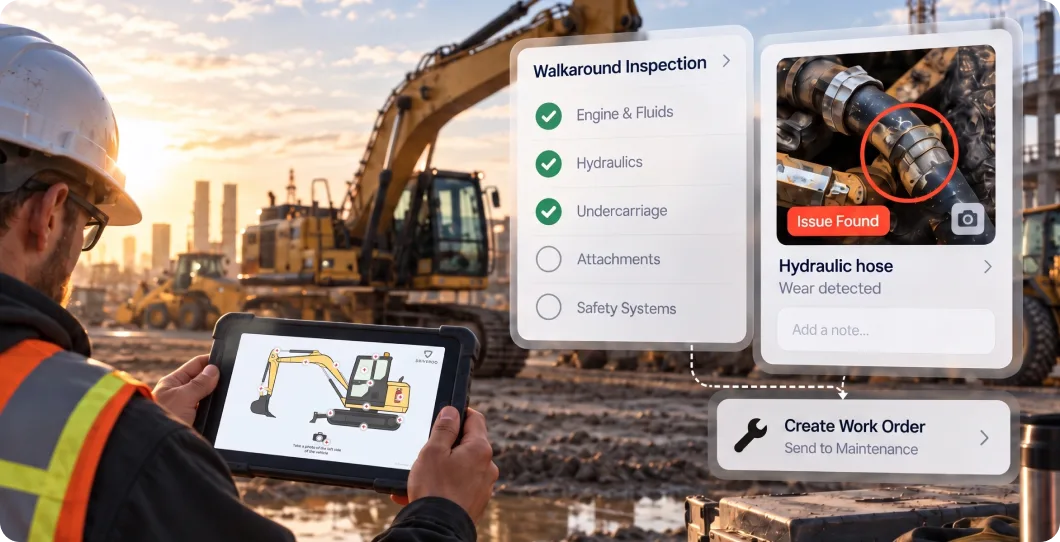
Heavy equipment inspection software guides operators through the pre operation and post operation checks that keep excavators, loaders, dozers, cranes, and other powered machinery safe to run. It replaces the paper walkaround checklist with a mobile workflow that standardizes what gets checked, captures findings with photos and notes, and in the strongest platforms routes a failed check to the people who can fix it.
The category is also called heavy equipment inspection apps, construction equipment pre operation checklists, digital equipment walkaround software, or plant and machinery inspection software. It ranges from a simple pass or fail checklist app to a visual, guided workflow that ties findings directly to preventive maintenance and repair work orders.
Heavy equipment inspection tools trace back to three main origins, and origin still predicts what a platform does well. Some grew out of digital forms replacing paper to digitize the clipboard, but were not built to close the loop after a defect is found. Others grew out of CMMS, where an inspection mainly exists to trigger a work order. A third group comes from construction fleet management and telematics providers, where inspection is one module inside a broader asset tracking and compliance platform.
Pre operation examination requirements vary by equipment type, industry, and jurisdiction. OSHA general industry and construction standards address specific equipment categories, and MSHA requires pre shift examinations for equipment used in mining. Regardless of the specific rule, a digital record of every heavy equipment pre operation inspection gives an employer a clear trail that inspections are happening and gives operators a fast way to flag a defect before it causes downtime or an incident.
Platforms Covered in This Guide
SafetyCulture
DIY, low-cost checklist digitizing for individual teams, particularly via the freemium plan
MaintainX
Maintenance teams that want inspections tied to work orders and PM
UpKeep
SMB and mobile-first maintenance teams that want a broad CMMS
HCSS Equipment360
Heavy civil and infrastructure contractors already on the HCSS suite
Tenna
Mixed construction fleets that want inspection folded into telematics and compliance
Driveroo
Teams that want one flexible platform spanning visual guided inspection to closed-loop repair
Heavy Equipment Inspection Software: Comparison at a Glance
Thirteen capabilities that decide whether a digital equipment walkaround actually closes the loop — from guided visual inspection points and pencil-whip prevention to what the platform does after a check fails.
Driveroo publishes this guide and appears in the comparison. Every mark is drawn from vendor documentation and third-party material — including the marks that favor competitors — and the reasoning behind each one is recorded in a source and data log.
| Capability | ||||||
|---|---|---|---|---|---|---|
| Pre-Operation / Pre-Shift Checklist | ✓ | ✓ | ✓ | ✓ | ✓ | ✓ |
| Visual, Asset-Specific Guided Points | – | – | – | – | – | ✓ |
| Conditional / Branching Logic | ✓ | ◐ | ✓ | – | – | ✓ |
| Photo & Video Defect Capture | ✓ | ✓ | ✓ | ◐ | ✓ | ✓ |
| Pencil-Whip Prevention (prior-issue recall) | – | – | – | – | – | ✓ |
| Issue → Work Order Automation | ◐ | ✓ | ✓ | ✓ | ✓ | ✓ |
| Operating-Hour / Meter-Based PM | – | ✓ | ✓ | ✓ | ◐ | ✓ |
| Parts & Warranty Management | – | ✓ | ✓ | ✓ | – | ✓ |
| Embedded Training / On-Demand Tips | ◐ | – | – | – | – | ✓ |
| AI in Workflow | ◐ | ◐ | ◐ | ◐ | – | ✓ |
| Telematics / Equipment Integration | ◐ | ◐ | – | ◐ | ✓ | ✓ |
| Missed-Inspection Alerts & Dashboard | ◐ | ✓ | – | – | – | ✓ |
| Offline Mobile (iOS / Android) | ✓ | ✓ | ✓ | ◐ | ◐ | ✓ |
| Ratings (G2 / Capterra) | 4.6 / 4.6 | 4.8 / ~4.8 | 4.5 / 4.6 | 4.6 / 4.1 or 4.5 (inconsistent) | 4.4 / 4.6 | 4.9 / 4.8 |
Compare any platform against Driveroo
Pick a platform to see it side by side with Driveroo, row by row.
Capability
Driveroo
Key: ✓ = full built-in capability | ◐ Partial = limited, add-on, or inconsistently documented capability | – = not available or not confirmed as a primary capability, including where no sourced vendor or third party documentation addressed the capability directly, rather than assuming it does not exist. Driveroo's inspection interface spans plain text checklists, interactive work instructions with image galleries and video, illustrations, and visual, asset-specific guided points, configurable per equipment type and mixed within a single inspection. The full mark above reflects that range. AI in Workflow note: a Partial mark does not mean the same thing across vendors. MaintainX's CoPilot generates maintenance procedures and surfaces analytics; a third-party review quotes a Capterra reviewer describing mixed results with AI accuracy on some OEM data. UpKeep's Nova AI analyzes failure history and sensor data to recommend better preventive maintenance intervals, a back-office scheduling function. HCSS's Copilot, introduced in the 2026 Winter Product Release, summarizes the Daily Digest and helps users find pages and answers inside the HCSS product, a navigation and lookup assistant. None of these guide the operator in real time during the inspection itself, which is the distinction the full mark is reserved for. HCSS's Capterra rating is shown as inconsistent because two independent sources cite different figures for the Equipment360 product specifically. Driveroo ratings are verified from live G2 and Capterra pages.
How to Choose the Right Heavy Equipment Inspection Software for Your Operation
1
Every heavy equipment inspection tool can produce a digital checklist, so assuming they are otherwise interchangeable can lead to a poor decision. The first evaluation question is scope. Are you solving one narrow pre operation problem, or do you need construction equipment safety inspection software that also covers scheduled maintenance, parts, and telematics across a mixed fleet? A single machine with light use may only need the first. An operation running excavators, loaders, and cranes across multiple sites usually outgrows a pre operation only tool quickly, since the same defect data is useful for maintenance, safety, and utilization planning at once.
2
The second question is what happens after a defect is found, and how much of that resolution process is built into the solution natively. Look for whether a failed check can generate a work order without re-entry, whether the platform supports operating-hour preventive maintenance rather than calendar date alone, and whether the platform includes parts tracking alongside repair work orders. Platforms that started as CMMS or construction fleet management tend to be stronger here, though it is worth checking whether that strength requires committing to a broader telematics or hardware contract just to get the inspection workflow.
3
Finally, consider usability and how the platform helps the person doing the inspection, especially a newer or lower-skill operator across a mixed fleet of different machine types. A generic text checklist may satisfy a basic walkaround requirement, but visual step-by-step guidance and prior issue recall tend to produce faster and more accurate execution. It is also worth checking a platform's AI capabilities. Some apply AI to simply building forms or generating work orders in the back office, while others build guidance into the inspection itself to improve consistency at the point of work.
Heavy Equipment Inspection Software: Vendor Snapshots
Overview: SafetyCulture, best known for its iAuditor app, is a digital forms platform first, and heavy equipment enters through a large library of checklist templates rather than a purpose-built heavy equipment workflow. Building a form in SafetyCulture is comparable in effort to building one in any other digital form builder; the platform's real distinction is a freemium plan, which puts a first digital checklist in reach of any individual supervisor or team without a purchasing process. That makes it a common entry point for teams testing digital inspections for the first time, typically as a single-team or single-site deployment rather than a coordinated organizational rollout. Its native closed-loop capability stops at corrective action assignment. There is no documented operating-hour PM engine or automated work order generation tied specifically to heavy equipment meter data, and its AI is applied to checklist template generation rather than guidance during the inspection itself.
Best for: Individual teams and first-time digitizers that want a low-cost, DIY way to try digital inspections, particularly through the freemium plan, rather than a purpose-built heavy equipment rollout.
Key features
Large template library covering heavy equipment, forestry, and construction machinery. Conditional logic and scoring. Offline inspections with photo capture. Corrective action assignment. Asset tracking with lifecycle and service records. AI-generated checklist templates. Freemium plan for individual and small-team use.
Limitation
SafetyCulture is a digital forms platform, and that is its ceiling as well as its strength. It captures inspection data and corrective action tasks can be assigned, but there is no documented operating-hour PM scheduling or automated work order generation, and it lacks a visual, asset-specific guided interface or AI-directed in-process inspection guidance. Its Analytics module surfaces missed and overdue inspections on a dashboard, but a proactive, automated alert to a supervisor was not confirmed in sourced material.
Overview: MaintainX is a mobile-first CMMS built around the work order, and its own published guidance treats heavy equipment as a core preventive maintenance use case, with meter-based scheduling cited as a textbook example. Inspection checklists are procedure based, and a failed item can automatically trigger a corrective work order. The company has invested in MaintainX CoPilot for procedure generation and analytics, functioning closer to a lookup and drafting tool than guidance delivered to the operator inside the inspection itself.
Best for: Maintenance teams that want heavy equipment inspections tightly linked to work orders, meter-based PM, and asset history.
Key features
Procedure-based digital inspections and checklists. Automated work order creation on inspection failure. Photo and offline capture. Preventive maintenance scheduled by operating hours as well as calendar date. Parts inventory tracking. MaintainX CoPilot for AI-assisted procedure generation and analytics.
Limitation
MaintainX lacks a visual, asset-specific guided inspection interface, and a pencil-whip prevention feature such as prior-issue recall is not documented. Its CoPilot AI functions in the back office generating procedures and analytics rather than guiding the operator during the inspection, and third-party reviews describe mixed results with AI accuracy on some OEM data.
Overview: UpKeep is a mobile-first, AI-powered CMMS built around work orders, preventive maintenance, and asset data, with inspection checklists as one module inside that broader system. Its checklist builder supports conditional logic that shows or hides follow-up tasks based on a technician's response, and a completed inspection can automatically generate a work order with priority set by the result. UpKeep's asset records track purchase cost, vendor, and warranty terms, and a dedicated Warranty Tracking tool looks up whether a given asset is in warranty, expired, or has no warranty on file. Parts inventory tracks stock across storerooms, sets reorder thresholds, and rolls part costs into work orders and total cost of ownership. Offline mode is built into the mobile app, letting technicians work through checklists, capture meter readings and photos, and sign off with no signal, syncing automatically once reconnected. UpKeep's Nova AI analyzes failure history and sensor data to recommend adjustments to preventive maintenance intervals, which is a back-office scheduling function rather than guidance delivered to the operator during the inspection itself.
Best for: SMB and mobile-first maintenance teams that want inspections built into a broader, easy-to-roll-out CMMS with strong parts and warranty tracking.
Key features
Drag-and-drop checklist builder with conditional logic. Photo and video attachments linked to checklist items. Automatic work order generation from failed or flagged inspection results, with priority set by result. Meter-based and calendar-based preventive maintenance scheduling. Parts inventory with reorder thresholds and purchase order automation. Dedicated warranty status tracking per asset. Offline mobile mode with automatic sync. Nova AI for preventive maintenance interval recommendations.
Limitation
UpKeep's inspection capability is a checklist module inside a general CMMS rather than a purpose-built heavy equipment workflow. There is no documented visual, asset-specific guided interface or pencil-whip prevention features like prior issue recall, and an automated missed or overdue inspection alert specifically was not confirmed in sourced material, though overdue work order notifications are a common CMMS pattern the platform likely supports in some form.
Overview: HCSS Equipment360 is a shop and fleet management platform built for heavy civil and infrastructure contractors, and it is typically adopted alongside the rest of the HCSS construction software suite, including HeavyJob, HeavyBid, and Dispatcher. Foremen and operators complete pre-shift inspections in the field, and a completed inspection is visible on the foreman's time card view so supervisors can see who has completed a check. Preventive maintenance can be tracked by odometer miles, meter hours, or days, and GPS-driven meter readings are available when paired with HCSS Telematics.
Best for: Heavy civil and infrastructure contractors already using or planning to adopt the broader HCSS construction software suite.
Key features
Digital pre-shift and daily safety inspections visible across foreman and shop views. Preventive maintenance tracked by hours, miles, or calendar date. Work order creation, mechanic time approval, and workload balancing. Parts inventory with an AI-powered procurement integration through Gearflow. GPS-driven meter readings when paired with HCSS Telematics. HCSS Copilot, introduced in the 2026 Winter Product Release, for in-product summaries and page lookup. Integrations across the HCSS product suite and accounting systems.
Limitation
HCSS Equipment360's full value depends on pairing it with other HCSS products, particularly HCSS Telematics for automated meter data. There is no documented visual, asset-specific guided interface, conditional logic, or pencil-whip prevention feature, HCSS Copilot is a navigation and summary assistant rather than in-inspection guidance, an automated missed-inspection alert was not confirmed in sourced material, and at least one verified reviewer reported the mobile app as iPad only with no Android version, which was not independently confirmed against current vendor documentation in this pass.
Overview: Tenna is a construction technology platform built for mixed fleets, spanning heavy iron, mid-sized equipment, vehicles, and small tools on one system. Inspection works through QR-code-tagged assets: an operator scans a code, completes a digital form, and can flag a defect as unsafe or noncompliant, which triggers an automated maintenance request. Inspection sits alongside GPS and BLE asset tracking, dash cams and driver scorecards, and DVIR, ELD, and IFTA compliance tools inside the same platform.
Best for: Contractors that want heavy equipment inspection folded into a single telematics, safety, and compliance platform built specifically for mixed construction fleets.
Key features
QR-code-based digital inspections tied to individual assets. Automated maintenance request generation from flagged defects. GPS and BLE asset tracking across heavy iron, mid-sized equipment, and tools. Dash cam and driver scorecard safety tools. DVIR, ELD, and IFTA compliance management.
Limitation
Tenna's inspection capability is a QR-triggered digital form rather than a visual, asset-specific guided workflow, and conditional logic, operating-hour PM scheduling, parts and warranty tracking, and an automated missed-inspection alert built specifically around the inspection step were not confirmed in sourced material. Getting the full inspection-to-maintenance loop generally means committing to Tenna's broader telematics and hardware stack rather than adopting inspection as a standalone tool.
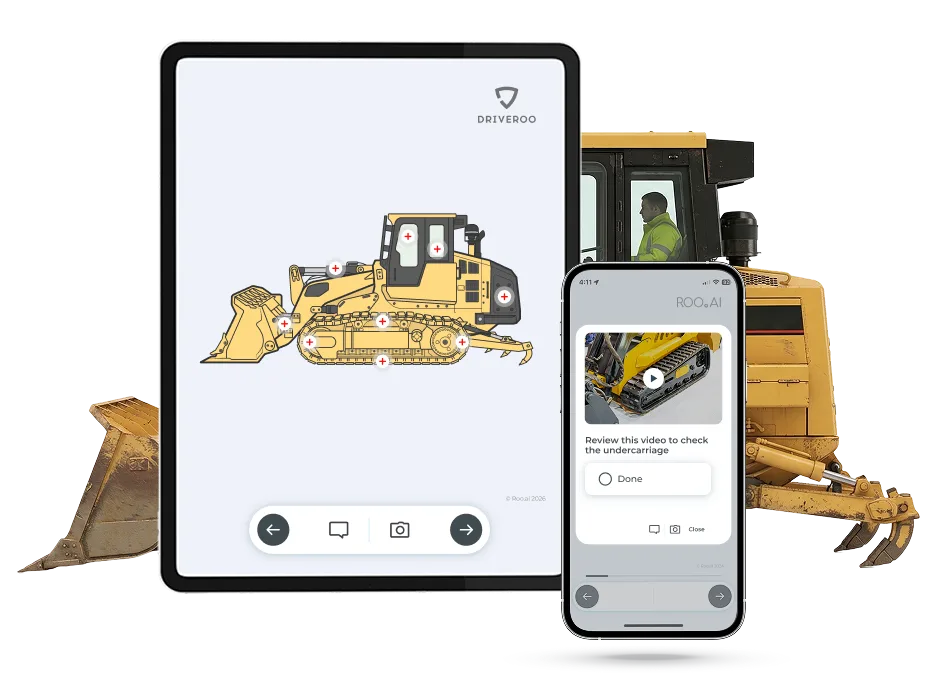
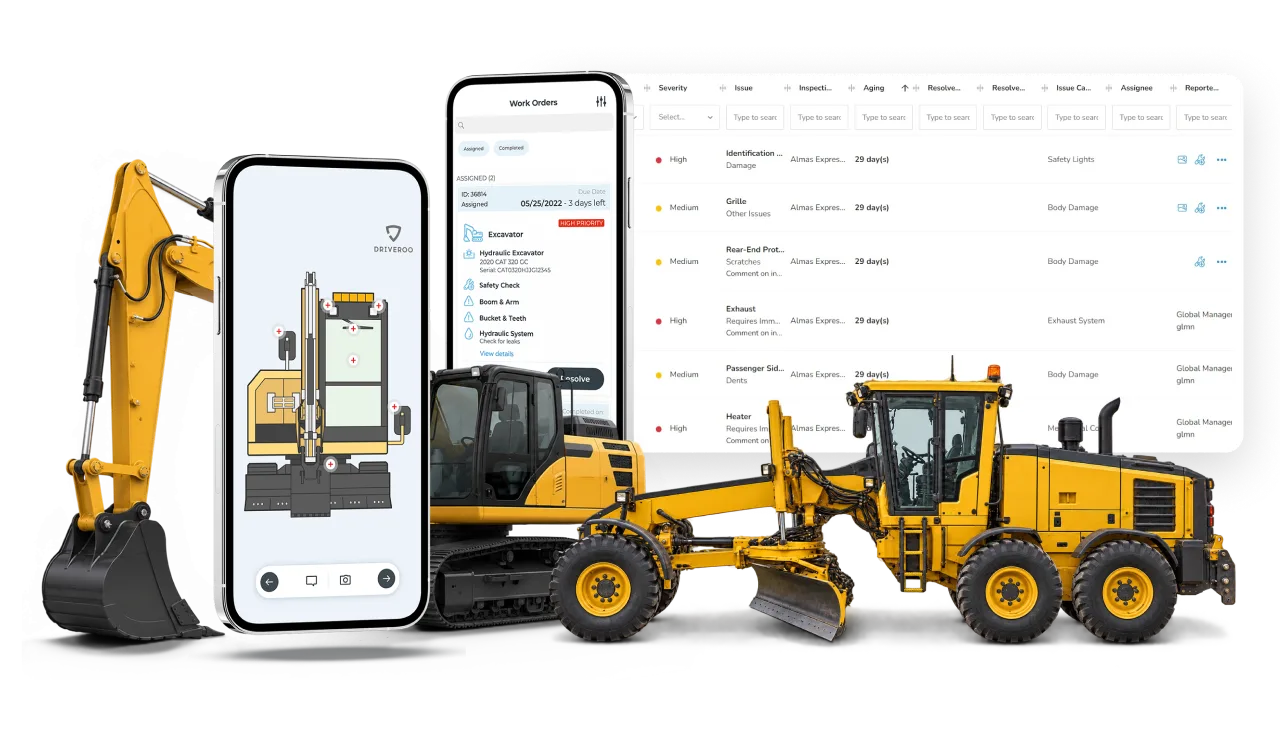
Overview: Driveroo, powered by ROO.AI, treats the pre operation check as the front end of a closed loop rather than a standalone form. The platform's inspection interface is flexible by design and is not limited to any one format. It supports plain text checklists, work instruction screens with image galleries and video, illustrations, or real equipment photos, and any of these can be made interactive for data entry and mixed within a single inspection. Rather than handing a customer a fixed template, Driveroo's white-glove concierge service configures each inspection to the customer's exact equipment, checkpoints, and process, drawing on prebuilt starting points for common heavy equipment types such as excavators, loaders, cranes, dozers, graders, and mixers where useful. A flagged defect can auto-generate a work order and feed a preventive maintenance schedule set by operating hours, miles, or calendar date, with parts, labor, and warranty status tracked against the asset. Conditional logic adapts the inspection in real time, and prior-issue recall is built to prevent pencil-whipping.
Best for: Operations running a mixed heavy equipment fleet that want one platform flexible enough to run anything from a plain checklist to a fully visual guided inspection, close the loop from defect to repair natively, and bring AI guidance to the frontline across equipment types.
Key features
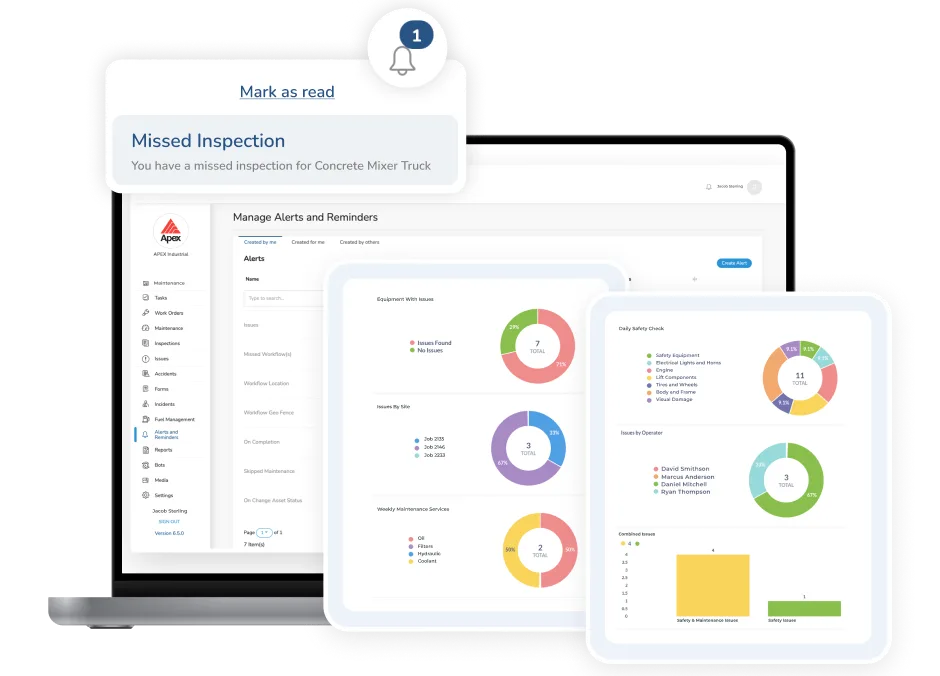
Flexible visual inspection interface. Conditional-logic guidance that adapts the inspection in real time. Recall of prior issues to prevent skipped or rubber-stamped steps. Automatic work order generation from flagged issues, with parts, labor, and warranty status tracked per asset. Preventive maintenance scheduling by operating hours, miles, or calendar date. Embedded micro-training and how-to instructions delivered inside the inspection flow. Real-time dashboards, missed-inspection alerts, and audit-ready reports. AI guidance can be delivered directly to frontline workers in the flow of work. Telematics integrations including Samsara, Azuga, Motive, and Verizon Connect. Works online and offline on iOS and Android.
Limitation
Driveroo's parts and warranty management, while complete enough to serve many customers, is lighter than what a dedicated CMMS or a construction telematics platform's parts network offers at large scale. There is no current self-authoring tool for building new inspection workflows without Driveroo's concierge service, which configures workflows as part of the subscription. That makes it more suited to broader departmental or organizational rollouts than the smallest, single-machine, do-it-yourself deployments. The company reports that an AI-based self-authoring function is on the roadmap.
See how guided equipment checks work end to end: Driveroo Equipment Inspection Software
Frequently Asked Questions
Heavy equipment inspection software is a category of mobile apps that guide operators through the pre operation and post operation checks required to safely run machinery such as excavators, loaders, dozers, and cranes, replacing a paper checklist with a structured, traceable digital workflow. It is also called heavy equipment inspection apps, construction equipment pre operation checklists, or digital equipment walkaround software. Examples covered in this guide include SafetyCulture, MaintainX, UpKeep, HCSS Equipment360, Tenna, and Driveroo.
The leading heavy equipment inspection options for 2026 include SafetyCulture (low-cost checklists from a large template library), MaintainX (maintenance-linked inspections with meter-based PM), UpKeep (inspections built into a broad, mobile-first CMMS), HCSS Equipment360 (shop and fleet management for heavy civil contractors already on the HCSS suite), Tenna (inspection folded into a construction telematics and compliance platform), and Driveroo (a flexible, visual, guided platform that closes the loop from inspection to defect repair and preventive maintenance). The best fit depends on whether you want a standalone inspection tool, a broader CMMS, or a platform tied to fleet telematics.
They differ more than a shared checklist format suggests. Most trace back to one of three origins: digital forms replacing paper, CMMS, or construction fleet and telematics platforms, and that origin determines what is native versus what has to be built with custom forms or a separate system. Scope is one differentiator, with basic products simply capturing inspection results and more advanced products automating the end-to-end process through to repair. Usability and embedded guidance is another difference, ranging from simple text forms to visually guided inspections with logic and automation. Finally, the use of AI is a newer differentiator, starting with AI used for template authoring or back-office work order generation and reaching toward AI guidance delivered inside the inspection itself.
Start with scope: does the tool only run the pre operation check, or does it extend into the broader maintenance, parts, and telematics workflows of asset performance management software that your operation will eventually need? Then evaluate native closed-loop capability, meaning whether a failed check can generate a work order, schedule preventive maintenance by operating hours, and carry through parts tracking without a second system. Finally, weigh frontline guidance and AI: a platform that guides and upskills the operator during the inspection itself, rather than only analyzing data after the fact, tends to produce faster onboarding and more consistent results across a mixed-skill workforce operating different machine types.
Requirements vary by equipment type, industry, and jurisdiction, so the applicable standard should be confirmed for the specific machine and site. As a general practice, powered equipment is typically examined before each shift or period of use, and mining equipment is subject to pre shift examination requirements under MSHA. A digital record gives an employer proof that inspections are being performed and gives operators a fast way to flag a defect and take a machine out of service before it causes an incident.
Generally not on its own. A CMMS manages work orders, parts, vendors, and cost tracking across an entire maintenance program. A heavy equipment inspection app operationalizes the daily and PM checks themselves and, in stronger platforms, feeds findings into work orders and PM schedules. Platforms such as Driveroo, MaintainX, UpKeep, and HCSS Equipment360 that include native work order automation and operating-hour PM scheduling may fill that role for a heavy equipment fleet, but buyers with broader maintenance needs should evaluate CMMS depth separately from inspection capability.
Most platforms in this comparison document offline capture for inspections, meaning an operator can complete a check without a live connection and have it sync once back online. SafetyCulture, MaintainX, and Driveroo explicitly document offline inspection capture. Offline support specifically for inspections was not independently confirmed for UpKeep and Tenna in this pass, and HCSS Equipment360's mobile availability was reported by at least one reviewer as iPad only.
See it on your own equipment
Turn every heavy equipment check into a closed loop, from defect to repair
Get Live Demo© Driveroo 2026 | Privacy | Asset and Fleet Management Software
This site uses cookies. We do this to remember your preferences so that we can improve our service. By using our site, you agree to our use of cookies.